
Before you spend even a single euro on ChatGPT Ads, you set four basic decisions: the campaign goal, the budget, the time period, and the area in which your ads appear. This guide shows you step by step how to fill out the campaign level in Ads Manager. You will also learn when reach, clicks, or conversions are the right goal and why conversions without a set-up measurement simply mean wasted money.
The video is only loaded from YouTube when you play it – data (including your IP address) is then transmitted to YouTube/Google. More in the privacy policy
This guide refers to a test account. The interface may change with updates, but the logic behind the decisions stays the same.
Key Takeaways
The campaign goal determines how you bid in the auction and which ad formats are available to you. So choose it deliberately.
Only set conversions as your goal once measurement (conversion tracking with a pixel, see Section 5) is set up. Without measurement, you lack the data to recognize which ads actually generate sales.
A daily budget is easier to control than a total budget. However, it is not an exact daily value: the platform may spend more on individual days, as long as the weekly limit is respected.
You should disable automatic text adjustment by AI if you want to retain control over language and content.
Step by Step
Step 1: Check the Prerequisites
Before you create the campaign, check three things: your account needs a logo and a brand name, and your payment details must be on file. If the payment details are missing, the campaign cannot be served later. You don't set up conversions yet, but only with the measurement from Section 5. Then open Ads Manager and switch to the "Campaigns" area.

Step 2: Create a Campaign from Scratch
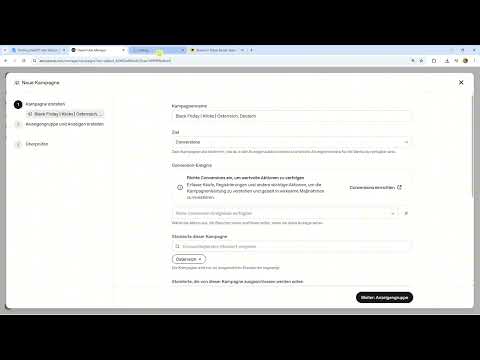
Click "Create campaign". Ads Manager then offers to have the AI create a campaign automatically. Decline this option and instead choose "Create from scratch". This way you keep every setting in your own hands. You then fill out the campaign level, the ad group, and the ad one after another. This guide initially covers only the top level; the rest follows in the next section.

Step 3: Assign a Descriptive Campaign Name
The campaign name is meant for you. You will find it again quickly later if you run several campaigns in parallel. A proven pattern combines occasion, goal, and location, for example "Black Friday – Clicks – Germany and Austria". A time period in the name is optional and in most cases not necessary, because the time period is set in the settings anyway.
Step 4: Choose the Right Campaign Goal
Ads Manager offers three goals to choose from. Reach means that you achieve as many impressions as possible. It is not about clicks, but about brand awareness. Large brands like Coca-Cola or Starbucks use this goal so that their logo sticks in people's minds. For small shops with a limited budget, it usually makes little sense.
Clicks is the goal for most beginners. You want as many people as possible to reach your ad and thereby your landing page or website. There they can get information and, in the best case, buy.
You choose conversions if you run an online shop and want to measure concrete actions such as purchases. For this you absolutely need conversion tracking and a pixel installed on your website. As long as this measurement is not in place, the conversions goal is wasted money, because without data the platform cannot optimize specifically for buyers. So set up the measurement from Section 5 first and then return to this decision. In this example, you stay with clicks.
Step 5: Define the Area
In the Locations area, you first select entire countries. However, Ads Manager also allows regions, cities, and postal codes. For a local hairdresser or restaurant, a narrow radius of about 10 to 20 kilometers makes sense, because hardly anyone travels across the country for an appointment. An online shop, on the other hand, sells nationwide and benefits from covering as many countries as possible.
If Vienna is to get its own campaign, you can select Austria without Vienna and set up Vienna separately. The same applies to Berlin. In this example, Germany and Austria in full are sufficient.
Step 6: Choose the Platforms
In the next step, you define on which devices and interfaces the ads will appear. The options are the ChatGPT app for iOS, the app for Android, and the web version in the browser. For most e-commerce brands, all three platforms make sense. Only exclude a platform if your website looks bad on that device or if purchasing is not possible there. For example, a shop where you can't place orders on a phone should avoid serving ads in the app at first.

Step 7: Set the Daily Budget
The daily budget is the amount you want to spend per day. In the example, a value of 50 euros per day is specified. It is important to understand how it is calculated: the value is an upper limit per week. At 50 euros per day, the maximum weekly spend is 350 euros, that is, seven days times 50 euros. The platform may spend more on individual days, for example double, if many requests come in. Spending is then lower on the following days so that the weekly limit is respected.
In everyday use, a daily budget is usually the better choice because it distributes spending more evenly and creates fewer fluctuations.
Step 8: Understand the Total Budget as an Alternative
In addition to the daily budget, you can also set a total budget for the entire campaign, for example 350 euros. However, the total budget is harder to control. The campaign can be used up after just two days even though it was supposed to run for a whole week, and then nothing happens for five days. That is why experienced advertisers in the major advertising networks generally work with the daily budget. You still define the time period itself via the start and end date.
Step 9: Disable Automatic Text Adaptation
The text adaptation option creates personalized ads using AI. In the process, texts are also translated. Imagine your ad is written in German, but someone is searching in Italian and is located in the selected area. The AI could then translate the ad into Italian on its own. This quickly leads to unwanted wording. You should therefore disable the option and check the ad texts yourself.
Step 10: Outlook on the Ad Group
With the campaign level, you have laid the foundations. Next comes the ad group, where you set the bid, among other things. There you decide how much you are willing to pay per click or result. The campaign-level settings already affect these steps, so you should fill them out completely and deliberately.

Summary – Setting Up a ChatGPT Ads Campaign: Define Goal, Budget, and Area
At the campaign level, you first define the prerequisites such as logo, brand name, and payment details, and then deliberately choose a campaign goal. Reach serves brand awareness, clicks bring visitors to your website, and conversions measure real actions but require a measurement setup. You determine the area according to your business model, that is, nationwide or multi-regional for an online shop or local with a small radius for service providers. A daily budget is easier to control than a total budget, as long as you keep the weekly limit in mind. Finally, you disable the AI text adaptation so that you control the language and content of the ads yourself.
FAQ
Question: Do I need to prepare anything before creating the campaign?Answer: Yes, your account should have a logo and a brand name, and the payment details must be on file. Without payment details, the campaign will not be served.
Question: When should I choose the Conversions goal?Answer: You choose Conversions if you run an online shop and want to measure purchases. A prerequisite is set-up conversion tracking with a pixel on your website.
Question: Why is the Conversions goal problematic without measurement?Answer: Without measurement, the platform has no data on which users buy. You then spend money without being able to track or control the results.
Question: Can a daily budget be exceeded on individual days?Answer: Yes, more can be spent on individual days, for example double. However, weekly spend is limited to seven times the daily budget.
Question: Which area makes sense for an online shop?Answer: An online shop usually sells nationwide or across regions, which is why entire countries such as Germany and Austria make sense. Local service providers such as hairdressers or restaurants, on the other hand, tend to work with a small radius.
Question: Should I enable automatic text adaptation?Answer: This guide advises against it. The AI could translate ads on its own and change their content, which is why you should keep control over your texts.


