
You're standing in front of the studio table, with nuts, wood and a cup in front of you, but still no clear idea of what your picture should look like? This is exactly where a mood board helps. With Pinterest, you can quickly collect images, details and ideas that you like, and arrange them into a direction for your later photo. This guide shows you how to go about it.
The video is only loaded from YouTube when you play it – data (including your IP address) is then transmitted to YouTube/Google. More in the privacy policy
Introduction
Many food photographers wonder where the ideas for a still life come from. The answer is unspectacular: they seek inspiration beforehand. That doesn't mean copying other people's photos. You collect images that appeal to you and take individual elements from them, such as background, light, props or arrangement. Every perspective carries your personal signature anyway, because you can never recreate someone else's image one hundred percent.
In this guide, you'll learn how to create your own board on Pinterest, search in a targeted way, evaluate images by individual aspects, and build a mood board with a plan from them.
Key Takeaways
- Pinterest is well suited as a pure inspiration tool. You don't have to post or comment anything there.
- A separate board for each topic keeps your ideas organized.
- When searching, it's worth testing terms in both English and German, because the results differ.
- You don't have to copy an entire image. It's enough to pick out individual parts such as the background, a detail or the lighting mood.
- Notes on props and open questions prevent you from working aimlessly on set.
- Pinterest boards can also be filled with images from other websites.
Step 1: Why Inspiration Before the Shoot Is Worthwhile
Before you lift a finger on set, you should take time to come up with ideas. Without preparation, the approach quickly becomes "I have some nuts here, let's see what happens." In the worst case, you experiment for hours and end up with no usable picture. With a mood board in your head, on the other hand, you know which direction you're working in.
A first look at the topic is enough to sharpen your vision. Take a look at what the inspiration phase looks like in practice.

Step 2: Creating Your Own Board
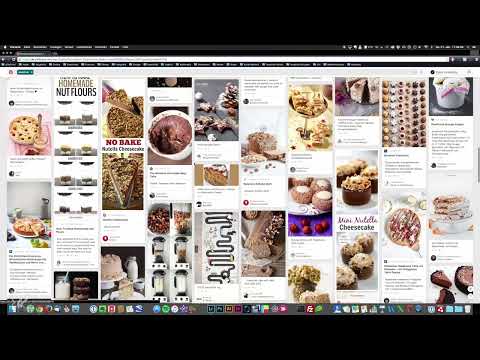
Log in to Pinterest and create a new board for each topic. In the example, a board serves as a collection for a still life with nuts. You can create as many boards as you like, so topics stay neatly separated. Give the board a name that immediately shows what it's about later on, such as "Nut Still Life".
Take a look at what the board looks like in the video and how the collected images are arranged there.

Step 3: Search in a Targeted Way and Vary Your Terms
Enter a keyword in the search field at the top, for example "Nuts". Pinterest usually delivers more hits for English terms because most images come from English-speaking users. German search terms work well too, though, and often deliver different results. So try both.
Make sure you don't phrase the search too narrowly. With a general term, you get a broad selection from which you can deliberately filter. This step is especially worthwhile if you haven't yet decided which motif you need.

Step 4: Evaluate Images by Individual Aspects
Now it's time to choose. What matters is that you don't decide based on the overall image you want to recreate later, but on individual elements that you like. One image might appeal to you because of the texture of the nuts, another because of the background. You don't have to adopt every detail. So pin everything that appeals to you, and later put together your own image from it.
In the video, the texture of the walnuts, an old cup in front of a book, the background of slanted wooden boards with visible nails, and a glass from which the nuts fall out stand out positively. The following section shows a good example of this focus on individual aspects.

Step 5: Working with Categories and a Mass of Ideas
Above you will find categories that you can use to narrow down the results if you are looking for specific motifs. A general search for nuts, for example, will give you a lot of pastries with hazelnuts, but fewer individual nuts. So filter specifically to find exactly what you need.
Don't underestimate the sheer number of images. Pinterest presents you with an enormous variety of ideas on a topic. It is precisely this mass that provides inspiration, because you come across motifs you would never have thought of yourself.

Step 6: Add your own ideas
As you scroll through the results, with a bit of luck you will find ideas that your board doesn't contain yet. Simply pin them to it. In the example, the combination of hazelnuts with and without shells is missing, for instance. You notice such gaps while browsing. Shell splinters left lying in the picture also look more authentic. So add images to your collection that show such details.
To pin, you select the desired image and click on "Pin". Then you decide which board it should land on. Afterwards, you will find it again in your collection.

Step 7: Take notes and check props
After collecting, it's best to spend about 20 minutes going through your board. Make notes on the things you definitely want to implement and on those that probably won't work well. Then check your existing props and note down what you still need to quickly make or get if you absolutely want to use it.
These notes form the bridge to the actual setup of the image. You will then know exactly which elements you need before you start arranging.

Step 8: Pin images from external websites
Pinterest has a Pin button that you can use not only on Pinterest itself. Many websites already display it, so you can send images, texts or other content directly from there to your board. This way you collect all your ideas in one place, no matter where they come from. In your board's window, you can then take everything in and recognize connections.
Step 9: From moodboard to image composition
Once you have collected your inspiration, you roughly know what you want to do. The next step is to build the image accordingly. Your moodboard helps you as a guide, so you don't have to rethink with every move which direction to take.
Summary – Finding inspiration with Pinterest moodboards: The path to your first image idea
With your own board, targeted search terms and a conscious selection of individual aspects, you create a solid foundation for your food photo. Note down props and open questions before you get started. This way you avoid a shoot ending without results in case of doubt, and you can approach the image with a clear plan.
FAQ
Do I have to recreate images by other photographers exactly?No. You collect ideas for background, light, props or arrangement. Every perspective and every setup automatically carries your own signature.
Do I need a Pinterest profile with my own posts?No. You can use Pinterest solely as an inspiration collection, without posting or commenting on anything yourself.
Should I search in English or German?Try both. English terms usually deliver more hits, but German search terms often bring different, equally interesting results.
Can I also collect images from other websites?Yes. Via the Pinterest button that many websites offer, you can transfer images and texts directly to your board.
How much time should I plan for the inspiration phase?The video mentions about 20 minutes. This time is enough to collect images, take notes and check the props.


