
Have you ever wondered how to use Facebook to specifically collect email addresses from interested prospects? That is exactly what this guide is about. I will show you step by step how to create a lead generation ad in Ads Manager, define the target audience, design an instant form, and properly include the legally required data protection information. Using a chocolate manufacturer as an example, you will go through the entire process, which you can then apply to your own offer.
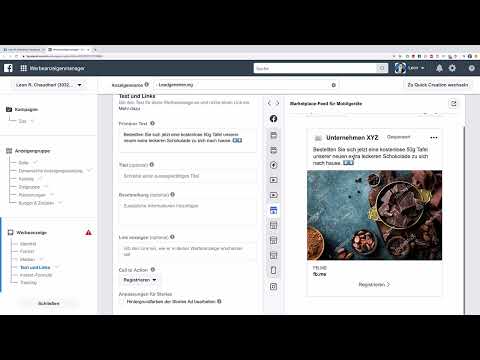
The video is only loaded from YouTube when you play it – data (including your IP address) is then transmitted to YouTube/Google. More in the privacy policy
Key Takeaways
- A lead ad is created in Ads Manager using the "Lead generation" objective. You can set the budget freely; for a meaningful test ad, around €200 is recommended.
- Before you start, you must read and confirm the terms of use for advertising that collects email addresses.
- You define the target audience by country, age, gender, and interests. Optimization is set to leads.
- The instant form consists of the ad, form overview, questions, privacy policy, and thank-you page.
- Fewer fields in the form generally mean more completed forms. You should only ask for the data you really need.
- A clear privacy policy with a link and a note on how the data will be used is mandatory for the form.
Step-by-Step Guide
Create and Name the Campaign
Open your Ads Manager on Facebook. Scroll down to the objective selection and choose "Lead generation" there. Then give the ad a meaningful name, for example "Lead Generation Number 1". This way you keep track when you later run several campaigns in parallel.

In the next step, you set the campaign budget. In the video example, €10 per day is planned. If you want to invest more, you can do so. For a test ad, a total budget of at least €200 is recommended so that you get reliable results.

Then you select the Facebook page through which the ad will be run. In the example, this is the page "Unternehmen XYZ".
Observe the Terms of Use
Before you can continue, Facebook requires you to confirm the terms of use for ads that collect email addresses. Read them carefully. The core is simple: You may only collect the addresses if you are actually the responsible party who takes care of the data, and you must use them carefully and in compliance with the law. Only once you have understood this obligation do you check the box "I agree to the terms of use".

Define Catalog, Target Audience, and Placement
In the ad delivery section, you can select a product catalog if you sell products and want to advertise them at the same time. In the example, this is skipped, since the focus is initially only on creating a lead ad.

You then define the target audience by location. In the example, Germany and Austria are selected. Switzerland is left out, as is Berlin, because many addresses have already been collected there. So you can also specifically exclude regions within a country.


In the example, the age range of 20 to 40 years is chosen as the target audience. Chocolate is set as the interest. Women are preferentially targeted in this example, as according to the audience insights they are more likely to buy chocolate. This is just an example. You should define your own target audience based on your offer and your analyses.

The audience size is displayed to you directly; in the example, it is around 3.6 million people. You can narrow it down further if needed. For placement, you leave the automatic selection active and set the optimization to leads, since in this case the email addresses are most important to you.

Designing the Ad
By clicking "Next" you get to the actual design of the ad. Here you connect your ad with the so-called Instant Form, through which prospects enter their data directly. In industry jargon, the form is also often called a lead form. When you hear these terms, this form is always what is meant.

First, upload a suitable image. Via "Add image" and "Stock photos" you will find images, for example by searching for "chocolate". Choose an image that fits your offer well, and click "Next".

Then you insert the primary text. It should describe the offer clearly, in the example: Order a free 50 g bar of our new, extra delicious chocolate to your home now. With emojis, such as small downward arrows, you direct users' attention to the area where they should click. You can conveniently copy and paste these arrows via the clipboard.


In the title field you formulate a short call to action, in the example "Order". Below that comes the description, which can create additional pressure, such as "Only a few bars left". For the button you choose between options such as "Sign up", "Learn more", "Book now" or "Get quote". In the example, the choice falls on "Learn more", since it leads the user to the form without making them feel pressured.


Creating an Instant Form
Scroll down to the Instant Form and click "New form". This form opens for the user as soon as they click "Learn more". You have two options: With "Higher volume" you get a short form that can be filled out quickly on a smartphone. With "Higher intent" you add a review step in which the information can be checked once more. In the example, the "Higher volume" variant is recommended, since it usually delivers more addresses. The review step can be useful, but it means an additional step for the user.


In the next section you define the overview that is displayed in the form. Here you can assign a title such as "Free 50 g bar of chocolate" and take over an image from the ad. Below that follows a short text or a list. In the example, a paragraph is used that invites the user to have their bar ordered to their home.

Defining the Requested Data
Now you determine which information you want to collect from prospects. In the example, these are the full name, the email address and the street address. The address is important because the bar is to be shipped physically.

An important rule of thumb in online marketing is: the shorter the path from first contact to submitting the data, the better. Long forms deter people. Facebook additionally offers you categories such as gender, military status, ID numbers, demographic information or further contact fields. You should carefully consider whether to use these. In the example, only the street address is requested in the form, plus an email address. If the postal code or city is missing later, you can request this information by email.


Set up privacy and thank-you page
The Privacy section now appears in the form. Facebook requires a privacy policy to be provided. For the link text, you can use "Privacy Policy", for example, and enter the URL of your own privacy page. Below that, you can add custom notes, such as consent to receiving advertising contact or additional disclaimers. This is optional, but it should be worded carefully.

Next comes the thank-you page. Here you can enter a simple text, such as "Thanks, that worked". However, you can also redirect the user to a website. In the example, they are taken to a survey, and as a reward there is another bar of chocolate. The link is given a button such as "Take part in survey".

Afterwards, you add the note explaining how the data will be used. In the example, it reads: We use your data for marketing purposes and to send you your free chocolate. We never sell your data to third parties. This sentence should reflect your actual practice, because users need to know what their data is being used for.

Click "Finish" at the top. Afterwards, you can go through the form in the preview. A prospect first sees the ad, clicks on "Learn more", fills out the form, confirms the privacy notices, and sees the thank-you page. With a click on "Confirm", you complete the process.

Summary – Lead generation on Facebook: Collecting emails with ads
You have seen that creating a lead generation ad consists of several clearly sequential steps. You set the campaign and the budget, confirm the terms of use, define your target audience, and design an ad with an appealing image and text. The instant form collects the desired data, supplemented by a privacy policy and a thank-you page. Make sure to ask only for the information that is really needed, and word the privacy notice transparently.
FAQ
Do I need a specific budget for a lead ad?You can start with a small daily budget, in the example with €10 per day. For a meaningful test ad, the video recommends at least €200.
Which option is better, Higher volume or Higher intent?The video recommends the Higher volume option because it offers a short form without a review step and therefore delivers more addresses. The Higher intent option adds a review step that lengthens the process.
How many fields should I ask for in the form?As few as possible. The shorter the process, the better. In the example, only name, email address, and street address are requested; further details can be requested later.
Do I have to provide a privacy policy?Yes, Facebook requires a privacy policy to be provided and linked in the form. In addition, you should transparently explain what the data is used for.


