
After Effects Workshop DVD - Basics & Tricks

- „Teach“ – Design-Vorlagen für Dozenten, Tutoren, Berater, Seminar- & Workshop-Anbieter
- Mit Flyer, Briefpapier, Visitenkarte, Anzeige, Roll-up & Facebook-Titelbild
- Erstelle eine Geschäftsausstattung in einem einheitlichen Corporate Design
Want to take other people's breath away? Increase your pulse rate now! This workout will get you moving with enthusiasm!
44 Videos, 1155 minutes
Intro to the video training
This is what you can expect in the video training "After Effects Workshop DVD - Basics & Tricks"
1 minYou can expect a video tutorial with lots of tips and tricks on how to get your pictures moving.
Basics
After Effects - Basics: General overview, user interface
18 minHere I go through opening After Effects for the first time, importing files, creating compositions and the program's user interface. Length: 21 minutes
After Effects - Basics: Preferences and workspaces
16 minHere I go into the presets in After Effects and explain their functions, advantages and disadvantages as well as my own experiences. I will also discuss how to define your own After Effects workspaces.
After Effects - Basics: Animation with keyframes
12 minIn this part, we will look at animations in After Effects and how to control them using the different keyframe interpolation types.
After Effects Basics: Effects and Adjustment Layers
13 minThis tutorial is about effects in After Effects to change and edit the footage itself. It also discusses how adjustment layers work and what they are for.
After Effects Basics: Layers, Modes, Masks and Shape Layers
15 minIn this part, I will show you the switches and modes of the layers in more detail. I also explain masks and shape layers in After Effects.
After Effects Basics: Time Distortion
16 minWith this part, the basics series is slowly becoming a little more specific. In this part, I will show you the different variants of time distortion in After Effects and the methods of frame blending that After Effects offers.
After Effects Basics: The 3D Space in After Effects
35 minIn this tutorial, I will use an example to describe how 3D space works in After Effects and we will also create our own small 3D composition. We will cover cameras, lights, nested compositions, material options and null objects.
After Effects Basics: Expressions in After Effects
35 minIn this tutorial I describe Expressions in its entirety. Links and other things that give a little insight into this side of AfterEffects. I'll also show you a few ways in which Expressions simplify the workflow or make it possible in some places.
After Effects Basics: Motion Tracking
38 minIn this tutorial, I describe the setting options and various tracking types available in After Effects in detail using a specific example. I also go into the additional software "Mocha", which has been included since CS4, but which is not necessary for this tutorial as it only deals with Mocha in the last part.
After Effects Basics: Rendering and Output to Flash
19 minIn this last part of the basic series, I describe the rendering process and all the settings to be made, as well as the export to Flash for creating a Flash banner with AfterEffects
Theory - Video compression
Video Compression Part 1 - Formats & Codecs
9 minIn this video training series, I would like to provide a brief insight into video compression to give everyone the opportunity to compress their videos optimally using their own knowledge. In this part, I will introduce the topic of "Formats & Codecs" for a basic understanding.
Video compression Part 2 - Size & frame rate
8 minIn this video training series, I would like to provide a brief insight into video compression to give everyone the opportunity to optimally compress their videos using their own knowledge. In this part I present the first setting options: Size & frame rate. I will also discuss interlacing and terms such as "PAL" and "720p".
Video compression Part 3 - Data rate & key frames
10 minIn this video training series, I would like to give a brief insight into video compression to give everyone the opportunity to optimally compress their videos using their own knowledge. In this part, I will introduce further setting options: The data rate as well as key frames. I will also go into the general principles of video compression and give my own tips on compression for the web.
Video Compression Part 4 - Audio Compression
6 minIn this video training series, I would like to provide a brief insight into video compression to give everyone the opportunity to optimally compress their videos using their own knowledge. In this part, I will introduce you to the few but essential setting options for audio compression and explain their respective meaning and effects.
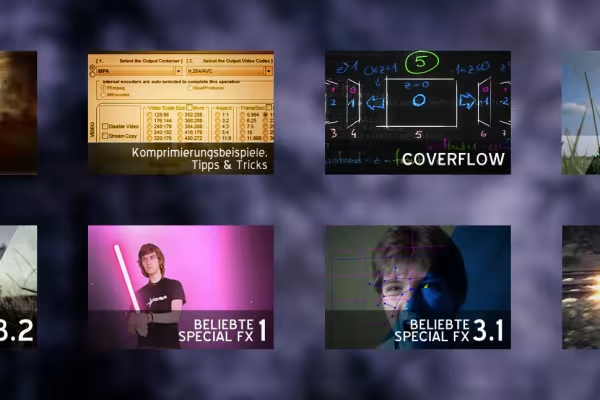
Video compression Part 5 - Compression examples, tips & tricks
19 minIn this video training series, I would like to give a brief insight into video compression to give everyone the opportunity to compress their videos optimally using their own knowledge. In this part, I'll give you my tips on compression programs using a few examples. I will also go through the entire compression workflow when creating a video training course.
Scripting
Scripting in AE - the basics
24 minIn this video training I give an introduction to the powerful tool of scripting and its basics.
I refer everything to Adobe After Effects, but you can also learn scripting basics for other programs such as Photoshop, InDesign or Illustrator.
Scripting in AE - Layer Renamer Part 1 - Script UI
22 minIn this video training I start with the creation of the script "LayerRenamer". In this part I deal with the structure of the user interface. All knowledge from this video training is transferable to all Adobe applications that support scripts (Photoshop, InDesign, Illustrator ...)!
Scripting in AE - Layer Renamer Part 2 - Panel & Functions
35 minIn this video training, I integrate the user interface created in the first part as a panel in the After Effects user interface and give the script the desired functions so that it does justice to its task of renaming layers.
Scripting in AE - TheWiggler Part 1 - Resizeable Panel
41 minIn this video training we start with the creation of the script "TheWiggler" by creating a dynamically scalable interface, this time in an alternative way. All knowledge from this video training is transferable to all Adobe applications that support scripts (Photoshop, InDesign, Illustrator...)!
Download the notepad:
Scripting in AE - TheWiggler Part 2 - The functions
54 minIn this video training we finish the script "The Wiggler" by giving it its functionality, namely that it sets randomly generated keyframes at a certain interval. We cover nested for-loops and some if-queries.
Scripting in AE - Script & link tips
42 minIn this video training I show you my script & link tips. What are useful scripts, where can you get them and also: Where can I find documentation to write my own scripts?
Expressions
Expressions in AE - Math in Expressions
29 minIn this video training series on the topic of expressions, I will teach a few advanced expression techniques using practical examples. In this introduction, however, I would like to explain the topic of math and functions in Expressions and show how this can be useful, for example, to create physical simulations.
Expressions in AE - Random jumping
39 minIn this video training series on the topic of expressions, I would like to share a few advanced expression techniques using practical examples. In this part on the topic of "Random Jumping", I demonstrate animation techniques with expressions and create a controllable random movement. We will also simulate the effect of "Trapcode Lux" with AE onboard tools.
Inspiration:
Expressions in AE - Creating a 3D helper
20 minIn this video training series on the topic of expressions, I would like to teach a few advanced expression techniques using practical examples. In this part, I create a 3D helper script that automatically moves a null object from one level to the next, focusing on the use of try and catch in expression programming.
Expression in After Effects - Coverflow
40 minIn this video training series on the topic of expressions, I would like to share a few advanced expression techniques using practical examples. In this part, I create the frequently requested coverflow effect and demonstrate the procedure for programming a previously unknown effect with sketches and case distinctions in expressions.
Expressions in AE - Creating a custom effect
26 minIn this video training series on the topic of expressions, I would like to share a few advanced expression techniques using practical examples. In this final part, expressions are not the focus at all, but rather the creation of your own custom effects in After Effects. A topic that has been kept very secret. A secret that I would like to reveal.
Video effects
In-depth color correction Part 1 - SA Color Finesse
15 minIn this two-part video training, I would like to show in-depth color correction - first in Synthetic Aperture's Color Finesse. All this taking into account the diagrams and display options for the color situation. Everything explained and shown in a practical way.
In-depth color correction Part 2 - AE on-board tools and magic bullet looks
20 minIn this two-part video training I would like to explain in-depth color correction - in this part with After Effects onboard tools. How can we do selective color correction there and how to create looks with the powerful Magic Bullet Looks plug-in? All this is covered in this video training.
Video effects - Part 1: Tilt/Shift, Rain/Snow, Old Movie
39 minIn this video training series, I have prepared a mash-up of the most popular video effects. In Part 1, we'll look at the tilt/shift effect, adding rain or snow and trimming the video to look old.
Video effects - Part 2.1: Matrix text and video look
18 minIn this video training series, I have prepared a mash-up of the most popular video effects. In Part 2.1, we will look at how to create the frequently requested matrix text and the video look for it using the simplest possible means.
Font used:
Video effects - Part 2.2: Replace sky and Day2Night
21 minIn this video training series, I have prepared a mash-up of the most popular video effects. In Part 2.2, we replace a monotonous sky with a realistically animated sky panorama and transform the scenery into a dark, mystical night scene.
Video effects - Part 3.1: Halftone effect
29 minIn this video training series, I have prepared a mash-up of the most popular video effects. In Part 3.1, I create the illusion of pressure in a video. This is called the HalfTone effect and is one of the most interesting effects. The video now consists of CMYK pressure points and no longer pixels.
Video effects - Part 3.2: Sin City look and earthquake
31 minIn this video training series, I have prepared a mash-up of the most popular video effects. In Part 3.3, I create the often requested Sin City effect and simulate an earthquake using an expression system.
SpecialFX
SpecialFX - Action scene Part 1 - On-location tips and muzzle flashes
32 minIn this SpecialFX series I would like to discuss the most requested VFX with you. Here we'll be covering an action scene, and this first part will be about a few on-location tips for shooting (especially alone) and how to create muzzle flashes.
SpecialFX - Action scene part 2 - Rotoscoping and explosion
39 minIn this SpecialFX series I would like to discuss the most requested VFX with you. Here we cover an action scene, and in this second part we add a believable explosion to the scene and put the person back in the foreground via rotoscoping.
SpecialFX - Hologrammer Part 1 - Advanced Screen Replacement
34 minIn this SpecialFX series, I would like to discuss the most frequently requested VFX with you. Here we will cover the realistic replacement of a screen and also the re-insertion of a foreground object. Both advanced tracking in Mocha and the improvement of the track with my CustomEffect-EPTrack will be used. ATTENTION! The CustomEffect is located in the working files!
SpecialFX - Hologrammer Part 2 - 2.5D Tracking and EPTrack
35 minIn this SpecialFX series, I would like to discuss the most frequently requested VFX with you. Here we will cover the 2.5D tracking of a scene by tracking the bare ground plane, refining the track with EPTrack and using it to position objects correctly in perspective. ATTENTION! The CustomEffect is located in the working files!
SpecialFX - Popular effects Part 1 - Laser sword
21 minIn this SpecialFX series I would like to introduce you to the most requested VFX. Here we cover the often requested simulation of a lightsaber, which we create completely in After Effects in 2 ways.
SpecialFX - Popular effects part 2 - Green screen car
16 minIn this SpecialFX series I would like to introduce you to the most requested VFX. Here we cover the compositing of a car video in front of a green screen to create the realistic result of a moving car with background and reflection.
SpecialFX - Popular Effects Part 3.1 - Avatar - Facetracking
31 minIn this SpecialFX series, I would like to discuss the most requested VFX with you. Here we'll cover the effect of creating an "avatar" with a focus on face tracking. We track the face so that we can apply every possible change to it.
SpecialFX - Popular Effects Part 3.2 - Avatar - Green Screen Composing
44 minIn this SpecialFX series, I would like to discuss the most requested VFX with you. Here we will cover the effect of creating an "avatar" with a focus on green screen compositing. We'll take a closer look at the keylight effect and I'll share my tips and tricks for keying poorly shot footage and blending it with a new background in a believable way.
New features
What's new in After Effects CS5.5
43 minAfter Effects CS5.5: Is it really worth it for you? Find out.
In this tutorial, I'll show you the latest features and improvements in the intermediate version of After Effects CS5.5.
What's new in After Effects CS6
45 minWhat's new in CS6? Is an update worthwhile? In this video training, I give a brief overview of what has changed in After Effects in this version and show you how to use the new functions.
Examples of use
-
 Get to know After Effects!
You might also like
How it works. What options exist.

Practical applications for companies
Produce high-quality videos

Edit films, transitions, animations, and more
Comment now „After Effects Workshop DVD - Basics & Tricks“