
Some photos look like they come from a gentle dream: the transitions blur, the lights seem to glow, and the subject takes on an almost otherworldly aura. You can create exactly this look with the Glamour Glow filter in the Nik Collection, specifically in Color Efex Pro 4. The filter is closely related to the well-known fog effect, but it dispenses with the white layer of color that the fog places over the image. As a result, colors and details stay clearer, while the contours still flow softly into one another. Personally, I use Glamour Glow rather rarely, because it doesn't suit every image style. With the right subjects, however, it is an effective option.
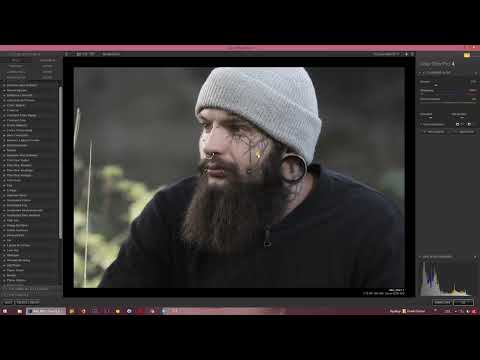
The video is only loaded from YouTube when you play it – data (including your IP address) is then transmitted to YouTube/Google. More in the privacy policy
Key Takeaways
- Glamour Glow blurs contours but, unlike the fog effect, does not place a white layer of color over the image.
- The warmth slider determines whether the entire image appears warmer or cooler.
- Saturation ranges from nearly complete desaturation to strong color enhancement at 100 percent.
- The glow slider is the heart of the filter: it controls how strongly brightness and contours blend into one another.
- Contrast is slightly increased, dark areas become darker, bright areas brighter.
- The effect works best with subjects that suit a soft, dreamy mood.
Step 1: Open Glamour Glow
Open your image in Color Efex Pro 4 and look for the Glamour Glow entry in the filter list. It is located near the fog effect, since both serve a similar purpose. Select the filter so that the settings appear in the panel. Keep in mind that you can adjust the effect again at any time or remove it completely.

Step 2: Determine the warmth of the image
The first slider decides the color temperature of the entire image. If you drag it to the right, the photo appears warmer, with golden and soft tones. If you drag it to the left, it looks cooler and more subdued. Try both directions before you decide, because even small shifts noticeably change the basic mood.

Step 3: Adjust saturation
Below that you will find the saturation. Here you can desaturate the image almost completely, so that only a delicate color effect remains. It won't be entirely without color, though, because the slider includes additional color components for green, skin tones, and blue. The opposite direction is also interesting: if you set the saturation to 100 percent, nothing unusual happens. The filter then simply intensifies the existing colors without any image areas being lost. So you can shape the image in both directions, depending on which atmosphere you want to achieve.

Step 4: Use the glow slider
Now comes the slider that makes Glamour Glow unique: the glow. If you drag it all the way to the left, the image stays sharp and the effect is practically switched off. If you drag it to the right, a soft veil settles over the subject, and the contours begin to blur. Approach it slowly until the balance is right. A value that is too high quickly makes the image look overexposed, while a moderate value provides an elegant glow.

Step 5: Check the transitions between light and dark
While adjusting, pay particular attention to the transitions between light and dark areas. A good example is the contrast between a light cap and a dark background. As the glow increases, both surfaces blend at the edge, so that the transition looks soft and almost painterly. This very effect gives the photo its special depth. Check the edges of your subject in the preview so that important details don't get completely lost in the glow.

Step 6: Keep an eye on contrast and brightness
Glamour Glow changes not only the contours but also the contrast. The dark areas become darker, the bright ones become brighter. At the same time, both zones blur into each other at the interfaces. This double effect creates an exciting look that still feels soft. If the result seems too harsh to you, first reduce the glow and then check the warmth and saturation again, because all the sliders influence one another.

Step 7: Finding the Right Image Style
Not every photo can handle this look. Glamour Glow works particularly well with portraits, romantic scenes, soft landscapes, or subjects with plenty of light and atmosphere. With sober documentary photos or images with fine, sharp structures, however, the effect can quickly be disruptive. Feel free to try it on several photos and compare the result with the original. Often you only discover through a direct comparison whether the glow underscores your image idea or dilutes it.

Summary – Glamour Glow in Color Efex Pro 4: Softly Blurring Contours
Glamour Glow is a filter in Color Efex Pro 4 that lets contours softly blend into one another without laying a white color layer over the image. With the Warmth slider you control the basic mood, with Saturation you decide on the color intensity, and with the Glow slider you determine the extent of the effect. The contrast is automatically slightly increased in the process. If you apply the filter specifically to suitable subjects, you get images with a special, dreamy effect that immediately captivates your viewers.
FAQ
How does Glamour Glow differ from the fog effect?With the fog effect, a white color layer is placed over the image; with Glamour Glow, this layer is omitted, so only the contours become softer.
What does the Warmth slider do?It shifts the color temperature of the entire image, making it appear warmer or cooler.
Can I remove the saturation completely?You can desaturate the image almost completely, since some individual color components are still retained in the slider.
What happens if I set the saturation to 100 percent?The existing colors are intensified without losing any image areas.
What is the Glow slider for?It determines how strongly the glow takes effect and how much contours and brightness levels blend into each other.
Does Glamour Glow also change the contrast?Yes, dark areas become darker and bright areas lighter, while at the same time they blur at the transitions.
Which images is the filter best suited for?It suits portraits, romantic scenes, and subjects with plenty of light and a soft mood, and less so sober or very detailed photos.


