
Imagine you are supposed to develop software for a car rental company. Terms like customer, vehicle, and booking quickly come up, and at some point someone says: "We need that as a class." I will explain step by step in this tutorial what exactly that means. By the end, you will be able to decide when you need a class, how to define it, and how it relates to concrete objects.
The video is only loaded from YouTube when you play it – data (including your IP address) is then transmitted to YouTube/Google. More in the privacy policy
The tutorial is based on a practical example: a database that you want to access with your program. The basic ideas apply regardless of the language. In PHP, however, you implement them directly with the keywords class and new.
Key Takeaways
- A class is a blueprint that defines the structure of objects: which properties they have and which methods they offer.
- An object is a concrete instance of this blueprint at runtime, in which real values are stored.
- You can create as many instances as you like from a class, each with its own values, but all sharing the same structure.
- Whether you need a class depends on whether it is a thing, a living being, a concept, or a resource that has similar properties and functions.
- Classes can be linked to one another so that objects of other classes can access them.
Step-by-Step Guide
Step 1: Understanding the Class as a Blueprint
The class is the central element of object orientation. An object-oriented language must offer classes or comparable structures so that you can define a blueprint for your objects. So in the source code, you define the structure that will later apply to every object. You specify which properties exist and which methods it provides.
This sounds abstract at first, but it quickly becomes tangible once you work through concrete examples. For now, remember: The class describes how something is structured, not what values it currently has.

Step 2: Checking Whether You Need a Class at All
Before you start programming, you should clarify whether a given matter actually deserves a class. Ask yourself a few questions. Is it a structure that you could simply represent as an array, or something that has its own properties and its own behavior? Can the matter sensibly be implemented as a method of another class?
These questions help you especially during software design, because they give you a direction before you write the first command.
Step 3: Distinguishing Living Beings, Objects, and Concepts
The type of the matter offers good orientation. With a living being such as a customer, a person, a user, or an animal, you manage something alive that is connected to real people or processes. With an object, you think of things like an iPad or a car at the car rental company. Consumer goods such as an apple can also be potential classes.
What is important: An object does not have to exist physically. Concepts, ideas, or virtual values such as an account, stocks, or license rights can also form classes. You buy a share without having a stack of paper delivered to your home. Nevertheless, it has properties such as quantity or price, which is why it can be modeled well as a class.
Step 4: Classifying Borderline Cases Correctly
Not every matter fits clearly into one category. A user, for example, can be a living being if you are managing a person. With an employee, you would regard the management of the employee as a living being, whereas the user account would be something that belongs to someone but does not exist in reality. Both perspectives can be correct, depending on what your program is supposed to model.
In the end, it often comes down to the fact that it is a class anyway. What matters is that you become aware of which properties and functions you need.
Step 5: Defining the Properties of a Database
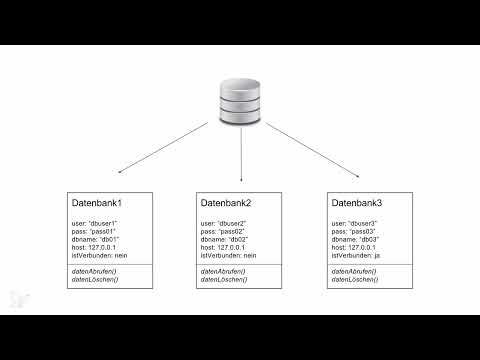
Now it gets concrete. Imagine you are working with several databases. Each of them needs a username, a password, a database name, and possibly a hostname if the database is accessible over a network. In addition, there is a property that records whether a connection currently exists or not.
If you compare the databases with one another, you notice: The information is basically the same, only the values differ. This is exactly the point at which a class becomes useful.
Step 6: Defining Properties and Methods Together
All objects of a class have the same properties. You have to define these beforehand. In addition, there are the methods, that is, the functions that an object provides. For a database, these would be things like retrieving data or deleting data. The functions are basically the same for all databases. The only difference lies in the storage location, that is, the target where the data is stored.
Step 7: Write the Class Definition
Now you define the class. It describes the blueprint you have just worked out. The definition is universal and does not depend on a specific language. In PHP, it could look like this:
At this point, the class is still empty, meaning without concrete values. It only shows what a database must be able to do.
Step 8: Create Instances
You can create as many objects as you like from a class. In PHP, this is done with the keyword new. Each of these creations returns an instance of the class. An instance is, in the end, the object itself.
The idea is that you define a class and then instantiate it as often as you need it. The relationship between class and object is the heart of object orientation.
Step 9: Understand Values per Instance
Each instance has its own memory area. This allows each object to take on different values. The first database may use a different user than the second, and the third may be located on a different host. Nevertheless, all instances belong together because they are based on the same class definition.
This encapsulation of values is a central feature. You work with multiple memory areas of the same class, each containing its own information.
Step 10: Link Multiple Classes Together
In larger projects, you rarely work with just individual classes. Imagine you are accessing a database server, a database, and tables within it. You would then have one class for the server, one for the database, and one for the table. The server class establishes the basic connection, closes it, and checks it. The database class builds on this connection and accesses tables. The table class represents the individual entries.
If there are, for example, three server instances, three databases per server, and three tables per database, there are a total of nine possible table instances. The classes depend on each other, because without a connection you cannot communicate, and without a database you cannot get to the tables.

Step 11: Think Class and Object Together
In the end, there is the basic principle. The class is the blueprint that defines how something is structured. The object is the concrete manifestation of this blueprint at runtime, in which real values are stored in the properties. Once you internalize this principle, you will recognize more quickly with every new project which classes you need and how they interact.
Summary – Understanding Classes in PHP: Blueprint for Objects Step by Step
You have seen that a class defines the structure that all associated objects share. It defines properties and methods without already setting concrete values. Only by creating instances with new do objects come into being, each with its own values. You can tell whether you need a class by whether a matter has similar properties and functions, regardless of whether it exists physically, virtually, or only conceptually. With this understanding, you lay the foundation for every object-oriented web application in PHP.
FAQ
What is a class?A class is a blueprint that defines which properties and methods its objects have.
What is an object?An object is a concrete instance of a class that stores real values in its properties at runtime.
Can you create multiple objects from one class?Yes, you can create as many objects as you like from a class, and each can have its own values.
Does an object have to exist physically?No, an object can also be a concept, an idea, or a virtual value such as an account or a license.
When do I use an array instead of a class?If a matter does not require its own functions or behaviors and merely bundles data, an array can be sufficient.
How do you create an object in PHP?You use the keyword new, for example $datenbank = new Datenbank();.


