
Have you ever wondered why a change to an object suddenly becomes visible in a completely different place? In this tutorial, you will learn to understand exactly this behavior. You will work with the two principles "Pass by Value" and "Pass by Reference". Both determine how PHP copies and passes on data. They are especially important when working with objects, because errors can easily creep in here.
The video is only loaded from YouTube when you play it – data (including your IP address) is then transmitted to YouTube/Google. More in the privacy policy
First, we will look at simple variables that behave like copies. Then we will look at objects, where only a reference is copied. In the end, you will know the difference and what to watch out for in your code.
Key Takeaways
Simple values are fully duplicated when copied. If you change the copy, the original remains unchanged.
Objects are not themselves duplicated when copied. Only a pointer, a so-called reference, to the same memory area is copied.
If you change the object via a copy, the original also changes, since both point to the same data.
With var_dump() or the targeted output of properties, you can check which variables actually share the same data.
Step-by-Step Guide
Step 1: Understanding Properties as Simple Values
A property is basically a variable inside a class. Let's start with the simplest case: you create a variable $name and assign it the value "Jan". Afterwards, you can change the value at any time, for example to "Peter". This is not rocket science yet, but it shows the foundation on which everything else builds.

Step 2: Checking the Output in the Browser
So that you can follow what happens in your script, you output the value with echo. An appended line break makes the output in the browser clearer. Then reload the page to see the result. This way you can immediately see which value is currently stored.

Step 3: Copying a Value
Now it gets more interesting. You create a second variable $name2 and assign it the content of $name. This creates a true copy of the value. If you then change $name2 to "Peter", $name remains untouched. Both variables are then completely independent of each other.
Step 4: Evaluating the Result in the Browser
When you reload the page, you see the difference: $name2 contains "Peter", while $name still contains "Jan". This is the behavior you expect from simple values. The value was completely copied during assignment, and each variable has its own memory area.

Step 5: Getting to Know References with Objects
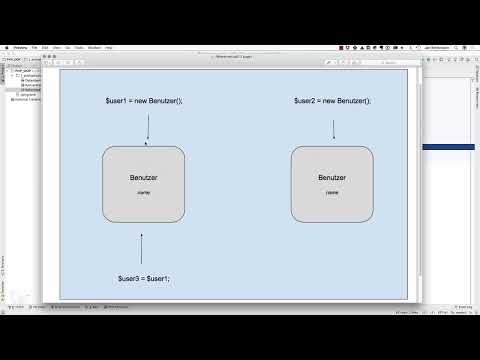
With objects, the principle works differently. A variable here does not directly contain the value, but a reference to the object in memory. You can imagine it like an arrow pointing to a piece of information. The property name then does not reside in the variable itself, but in the object it points to. A graphic helps you internalize this.

Step 6: Creating Objects and Copying a Reference
Now you define a class with a public property and create two objects from it. Each object has its own memory space for its name. The crucial question comes when you assign an object to a new variable.

Step 7: Evaluating the Output
The result is clearly visible in the browser. $user3 contains "Copy", as expected. But $user1 now also outputs "Copy", even though you did not directly change $user1 after creating it. The reason is that only the reference was copied. Both variables point to the same object, and whoever changes the property via one of the two variables changes the shared object.

Step 8: Deliberately Distinguishing Between Values and References
The difference can be summarized as follows: With simple values, copying creates a new, independent memory area. With objects, copying merely creates another reference to the existing memory area. So if you need independent data in your project, you must deliberately create a true copy of the object, for example with clone. Otherwise, all variables share the same data.
Summary – Understanding PHP References: Copying Values vs. Referencing Objects
You have seen that PHP handles copying values and objects differently. Simple values are fully duplicated and remain independent afterwards. Objects, on the other hand, are linked via references. If you copy an object variable, both point to the same memory area, and changes affect all references. Anyone who knows this mechanism avoids unexpected errors and uses copies deliberately.


