
So far, your index controller outputs the image data directly. That works, but it mixes logic and presentation. With a view layer, you separate the two: the controller decides which data is needed, and a template takes care of only the HTML. In this tutorial, you build a view object, load a PHP template file in it, pass it a data array, and create a common base class that lets all controllers render templates.
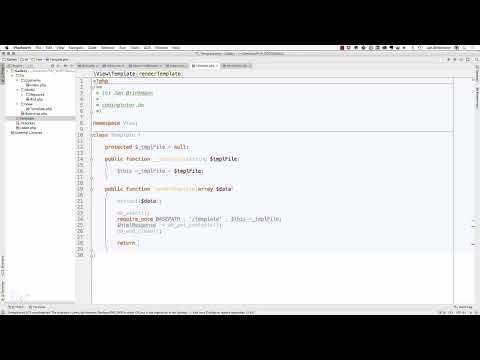
The video is only loaded from YouTube when you play it – data (including your IP address) is then transmitted to YouTube/Google. More in the privacy policy
The look of the gallery is still determined by HTML and CSS. The PHP side only provides the structure and the data.
Key Takeaways
- A view object encapsulates the loading and processing of a template and returns the result as text, without outputting it directly.
- The
render()method accepts a data array, which becomes available as variables in the template viaextract(). - An output buffer (
ob_start()andob_get_clean()) captures the content of the template and returns it as a string. - A
Baseclass in the controller namespace bundles the rendering, so that every controller can use it with a single call. - Output with
echoonly happens in the controller. This preserves the separation between view and controller.
Step-by-Step Guide
Step 1: Understand the starting point in the index controller
First, take a look at your index controller. Images are already being read there and their information, such as file name or existence, is output. However, the presentation in HTML is still missing. This point is the starting point for the extraction, because you don't want to program the logic for the output a second time.

Step 2: Create the view object as its own class
Create a new directory in the project with the namespace view. In it, you create the file template.php with the class Template. It also gets the namespace view. The class should have only one task: load a template, process it, and return the result. Separating it into its own namespace keeps the code organized once more views are added.

Step 3: Define the property and constructor
The class receives a protected property for the file name of the template. It is declared as protected so that later subclasses can access it. In the constructor, you pass the file name of the template and store it in this property. This allows the class to later fall back on exactly this file.

Step 4: Write the render() method with an output buffer
The render() method is the heart of the view object. It accepts an array with data, such as $data. With extract($data), the keys of the array become individual variables that are directly available in the template.
Then you start an output buffer with ob_start(). Next, you include the template with require_once. The path is composed of a base constant and the subdirectory templates. Since the output buffer is active, the content is not sent directly to the browser. With ob_get_clean(), you retrieve the collected output as a string, end the buffer, and return the string with return. An echo does not belong at this point, because output is the controller's job.

Step 5: Create the common base class Base
So that not every controller has to instantiate the view class by hand, you create a base class Base in the controller namespace. It contains a render() method that accepts the template name and the data array. Inside the method, you create a new Template object, pass it the template name, and call its render() method with the data array. The result is returned directly.
You can add more helper methods later. For now, this one method is enough to render templates centrally.

Step 6: Switch the Index Controller to the Base Class
Now the index controller uses the new base. It inherits from Base and calls the render() method with the name of the template, in the example bilder. You remove the previous heading and the direct output of the images from the controller. Instead, you pass the array with the images as data. The controller handles outputting the result with echo.

Step 7: Create the Template bilder.phtml
Create the file bilder.phtml in the templates directory. The extension phtml indicates that HTML is mixed with a few PHP elements. In the head of the template, a simple basic HTML skeleton with a title and a character encoding (UTF-8) is enough. The body contains the actual output.
Since extract() previously converted the array into variables, the variable $bilder is available to you in the template. With a foreach loop you iterate through the array and output an img tag for each image object. The loop deliberately stays simple, because in the template you can use PHP constructs such as loops at any time without using a separate template engine.

Step 8: Adjust Image Paths and Fix Errors
The src attribute in the img tag needs a correct path. A path with a leading slash is interpreted as an absolute URL. Therefore, create a directory bilder at the top level and copy a test image into it, for example test1.png. In the video, the file name is renamed in between so that it matches the database.
Typical errors occur during testing: a missing slash at the end of the path leads to wrong links, and a misspelled server variable name prevents the image file from being found. Check the generated src attributes in the browser's source view and open the link directly in a new tab. This way you can quickly tell whether the path or the file is the problem.
Step 9: Check the Dynamic Output from the Database
Finally, you reload the page. The images are now output via the template and come from the database. To test this, you can duplicate an entry in the database administration and reload the page. If an additional image appears, the chain of controller, base class, view object, and template works.

Summary – PHP Gallery: Using View Objects and Templates Correctly
You have moved the output of your gallery out of the controller. The view object loads a template, provides the passed data, and returns the finished HTML as a string. The base class Base makes rendering available to all controllers. The template bilder.phtml handles the presentation, while the controller continues to decide which data is displayed. The next step is about adapting the design of the gallery with HTML and CSS.
FAQ
Why does the render() method return the content instead of outputting it directly?This preserves the separation between view and controller, and the controller itself decides when and how the output occurs.
What does extract() do in the template?extract() converts the keys of the data array into individual variables that can be used directly in the template.
Why is the file named with the extension phtml?The extension indicates that it is HTML mixed with a few PHP elements. It is still processed by PHP.
Do I have to use a template engine like Twig?No. For simple templates, plain PHP with loops and outputs is enough. Twig or other engines are an option when projects become larger.
What is the base class Base for?It bundles the method for rendering templates so that every controller can inherit it and use it without duplicate code.
What do ob_start() and ob_get_clean() mean?ob_start() starts an output buffer that temporarily stores the output. ob_get_clean() reads the stored content and ends the buffer.
Why is the slash at the end missing in some image paths?A missing slash in the directory path leads to wrong links. Make sure the paths are assembled completely and correctly.
How can I check whether the image path is correct?Open the browser's source view and check the src attributes. You can also open the link directly in a new tab.


