
DxO PhotoLab 3: Tutorial for photo editing and image correction

- DxO PhotoLab 3: Get to know the possibilities and functions of the software
- How to use the raw development program for photo editing and image correction
- Easy to get started: installation, manage photos and metadata, targeted file export
- Work effectively: Using palettes, time-saving navigation, sensible settings
- Practical explanation: What the PhotoLab 3 editing filters can do and how to use them
- Three compact yet in-depth hours in a video tutorial by Marco Kolditz
Are you still looking for the right raw developer for you? Would you like to switch from another program? Or do you already know PhotoLab and want to know more? - This is your tutorial!
36 Videos, 197 minutes
Intro
DxO PhotoLab Tutorial: Intro
1 minWelcome to the DxO PhotoLab video training course. Here is the intro to the course, in which video trainer Marco Kolditz gives you an overview of the content.
Entry
DxO PhotoLab Tutorial: 1.1 | Installation
6 minIn this video, video trainer Kolditz shows you how to download and install DxO PhotoLab 3 from the manufacturer's website and how to use this website to determine whether your cameras and lenses are supported by the RAW developer.
DxO PhotoLab Tutorial: 1.2 | User Interface
14 minIn this video, you will get to know the clean user interface of DxO PhotoLab 3 and learn how to use it optimally.
DxO PhotoLab Tutorial: 1.3 | Save your own workspace
4 minIn this video, learn how to customize the DxO PhotoLab 3 workspace according to your needs and save it as your own workspace so that you can access it at any time.
DxO PhotoLab Tutorial: 1.4 | Preferences
10 minLike many other programs, DxO PhotoLab 3 offers practical program settings that you can adjust according to your own wishes. In this video, Marco Kolditz presents the program's default settings.
DxO PhotoLab Tutorial: 1.5 | File Management
12 minIn addition to the use of various RAW file development options, PhotoLab 3 also serves in part as a practical file manager. Watch this video to learn how to work with files in DxO PhotoLab 3.
DxO PhotoLab Tutorial: 1.6 | Metadata
5 minWith the help of DxO PhotoLab 3, it is possible to view and even adjust the metadata of RAW files. In this video, video trainer Marco Kolditz shows you how to read out the metadata and adjust it if necessary.
DxO PhotoLab Tutorial: 1.7 | Organizing photos I
14 minIn this and the next video, learn how to organize your photos in DxO PhotoLab 3, how to star, reject or accept images, and how the folder structure on your hard drive interacts with PhotoLab 3.
DxO PhotoLab Tutorial: 1.8 | Organizing Photos II
7 minFollowing on from the previous video, you will learn how to organize photos within DxO PhotoLab 3, how to star, reject or accept images, and the close interaction between the folder structure of your hard drive and PhotoLab 3.
DxO PhotoLab Tutorial: 1.9 | Navigation and Zoom
8 minWhen working with your RAW images, it is very useful to know exactly how to navigate through your numerous images as fast as an arrow and also save time during editing by using keyboard shortcuts or making sensible use of the mouse.
DxO PhotoLab Tutorial: 1.10 | Export files
10 minDxO PhotoLab 3 offers a very interesting export option for saving files in different formats, allowing you to save the same file directly in different file formats, sizes and locations at the same time with a single export.
Pallets in general
DxO PhotoLab Tutorial: 2.1 | Palettes in general
14 minIn this video, learn about the general structure and usage principle of DxO PhotoLab 3's numerous palettes and how to use them effectively.
DxO PhotoLab Tutorial: 2.2 | Histogram
5 minIn this video, learn about the important histogram for assessing the tonal value distribution of your images. Trainer Marco Kolditz explains exactly how to read a histogram and how to use it to determine how you should ideally edit your images.
Exposure
DxO PhotoLab Tutorial: 3.1 | Exposure compensation
7 minIn this video, you'll learn about DxO PhotoLab 3's Exposure Compensation editing filter and how to use it effectively when editing your RAW images.
DxO PhotoLab Tutorial: 3.2 | DxO Smart Lighting
5 minIn this video, you'll learn about the DxO Smart Lighting editing filter in DxO PhotoLab 3 and how to use it effectively and specifically when editing your RAW images.
DxO PhotoLab Tutorial: 3.3 | Selective tonal values
4 minIn this video, you'll learn about DxO PhotoLab 3's Selective Tone editing filter and how to use it effectively when editing your RAW images.
DxO PhotoLab Tutorial: 3.4 | ClearView Plus
5 minIn this video, you'll learn about DxO PhotoLab 3's ClearView Plus editing filter and how to use it to edit your RAW images.
DxO PhotoLab Tutorial: 3.5 | Contrast
4 minIn this video, you'll learn about DxO PhotoLab 3's Contrast editing filter and how to use it effectively when editing your RAW images.
DxO PhotoLab Tutorial: 3.6 | Tone Curve
6 minIn this video, you will learn about DxO PhotoLab 3's Tone Curve editing filter and how to use it effectively when editing your RAW images.
DxO PhotoLab Tutorial: 3.7 | Vignetting
3 minIn this video, you'll learn about DxO PhotoLab 3's Vignetting editing filter and how to use it effectively when editing your RAW images.
Color
DxO PhotoLab Tutorial: 4.1 | White Balance
4 minIn this video, you'll learn about DxO PhotoLab 3's White Balance editing filter and how to use it effectively when editing your RAW images.
DxO PhotoLab Tutorial: 4.2 | Color Accentuation
3 minIn this video, you'll learn about DxO PhotoLab 3's Color Accentuation editing filter and how to use it effectively when editing your RAW images.
DxO PhotoLab Tutorial: 4.3 | Color rendering
2 minIn this video, you'll learn about DxO PhotoLab 3's Color Rendering editing filter and how to use it effectively when editing your RAW images.
DxO PhotoLab Tutorial: 4.4 | Style Toning
4 minIn this video, you'll learn about DxO PhotoLab 3's Style Toning editing filter and how to use it effectively when editing your RAW images.
DxO PhotoLab Tutorial: 4.5 | HSL
4 minIn this video, you will learn about DxO PhotoLab 3's HSL editing filter and how to use it effectively and specifically when editing your RAW images.
Details
DxO PhotoLab Tutorial: 5.1 | Noise Reduction
4 minIn this video, you'll learn about DxO PhotoLab 3's Noise Reduction editing filter and how to use it effectively when editing your RAW images.
DxO PhotoLab Tutorial: 5.2 | Chromatic Aberration
3 minIn this video, you'll learn about DxO PhotoLab 3's chromatic aberration editing filter and how to use it effectively when editing your RAW images.
DxO PhotoLab Tutorial: 5.3 | Repair
6 minIn this video, you'll learn about DxO PhotoLab 3's Repair editing filter and how to use it to process your RAW images.
DxO PhotoLab Tutorial: 5.4 | Unsharp Masking
2 minIn this video, you'll learn about DxO PhotoLab 3's Unsharp Masking editing filter and how to use it effectively when editing your RAW images.
DxO PhotoLab Tutorial: 5.5 | Moiré
1 minIn this video, you will learn about DxO PhotoLab 3's Moiré editing filter and how to use it effectively and specifically when editing your RAW images.
DxO PhotoLab Tutorial: 5.6 | Red Eyes
2 minIn this video, you'll learn about DxO PhotoLab 3's red-eye editing filter and how to use it effectively when editing your RAW images.
Geometry
DxO PhotoLab Tutorial: 6.1 | Horizon
2 minIn this video, you will learn about DxO PhotoLab 3's Horizon editing filter and how to use it effectively and specifically when editing your RAW images.
DxO PhotoLab Tutorial: 6.2 | Crop
2 minIn this video, you'll learn about DxO PhotoLab 3's Crop editing filter and how to use it effectively when editing your RAW images.
DxO PhotoLab Tutorial: 6.3 | Distortion
2 minIn this video, you'll learn about DxO PhotoLab 3's Distortion editing filter and how to use it effectively when editing your RAW images.
Local adaptations
DxO PhotoLab Tutorial: 7 | Local Adjustments
6 minIn this video, video trainer Kolditz presents the extremely practical Local Adjustments feature of DxO PhotoLab 3, which allows you to apply filter effects to specific areas of an image.
New features in DxO PhotoLab 3.1
DxO PhotoLab Tutorial: 8 | Assigning and managing keywords
7 minThanks to the DxO PhotoLab 3.1 feature update, it is now finally possible to work with keywords in the Windows version of the program. In this video, video trainer Marco Kolditz shows you how to assign keywords to individual or multiple images at the same time and filter your image collection based on them.
Examples of use
-
 Example: Use the tutorial to find your way around DxO PhotoLab 3 right from the start.
 -
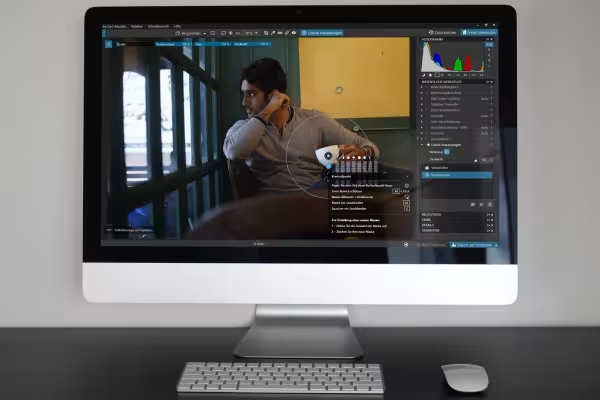 Example: Know all the important editing filters and how to use them to optimize your photos.
You might also like

20 sets in 4K (4096 × 4096 px, 300 DPI) as JPG plus Photoshop patterns, calibrated to the fill method

100 presets in 5 themes · each look in .xmp, .dng, and .costyle · for desktop and smartphone

More style, more power, more templates!

Full power, more inspirations, maximum WOW effect!
Comment now „DxO PhotoLab 3: Tutorial for photo editing and image correction“