
A workflow is quickly built, but before you use Google Opal in everyday life or in a company, it's worth taking a close look at where your data goes. This guide shows you how the tool handles security and data protection, which responsibilities lie with you, and which habits help you build stable and secure workflows. It is aimed at everyone who wants to use Opal productively, both privately and professionally.
The video is only loaded from YouTube when you play it – data (including your IP address) is then transmitted to YouTube/Google. More in the privacy policy
Key Takeaways
- Google Opal is a cloud-based tool. Your workflows run on Google's servers and not on your local computer.
- Data you enter or upload can be processed externally and, in some cases, used to train AI models. Subsequent deletion is then hardly possible.
- You should be especially careful with personal data, customer data, internal documents, or financial data, and use test data whenever possible.
- Data transmission is encrypted (HTTPS), and storage takes place within Google's infrastructure. Nevertheless, responsibility for data protection remains with you.
- A strong password and two-factor authentication protect your Google account and thus your workflows.
- Check legal requirements such as the GDPR before you process data, because cloud data can also be transferred to other countries, such as the USA.
Step-by-Step Guide
Step 1: Understanding Opal's Cloud Principle
Before you place the first building block in your workflow, you should know where Opal runs. The tool comes from Google Labs and works entirely in the cloud. Your workflows are not executed locally, but via Google's servers. The same principles therefore apply as with other cloud services: Everything you upload or enter can in principle be passed on to external systems and processed there. Treat every input as if you were pasting it into any online platform.

Step 2: Keeping Track of Your Data's Path
A common misconception is that inputs in a workflow are automatically safe because they are only used for your own purposes. With cloud-based AI services, this is not always the case. In some cases, data flows into the training of the underlying language model (LLM). After processing, it can then hardly be completely removed. Before every input, therefore, ask yourself whether you would be comfortable with passing it on to an external service.
Step 3: Recognizing Sensitive Data
Not every piece of information is equally delicate. You should be especially careful with customers' personal information, confidential business data, internal documents, and financial data. A simple test helps: Would anyone be harmed if this information became public? Then it counts as sensitive data and should not enter a workflow unchecked.

Step 4: Working with Test Data and Anonymizing Information
The recommendation is clear: First build new workflows with test data. Only once the logic runs reliably should you check whether real data is needed at all. If so, anonymize it beforehand. Remove names, addresses, account numbers, or other unique identifiers, or replace them with placeholders. This way you test the functions without it being possible to draw conclusions about real people.

Step 5: Checking the Legal Framework
Before you process personal data, clarify whether this is legally permitted. In Europe, the GDPR is the central standard. Also keep in mind that data in the cloud can be transferred to other countries and further processed there, such as in the USA. If you are unsure, consult your company's data protection office or legal counsel.
Step 6: Using Google's Security Features
Since Opal is part of the Google world, you benefit from the company's general security standards. Data transmission is encrypted via HTTPS, and storage takes place within Google's infrastructure, which is considered very stable. This is a solid foundation, but it does not replace your own diligence. Encryption protects the data from unauthorized access on its way, but says nothing about how the content is handled later.

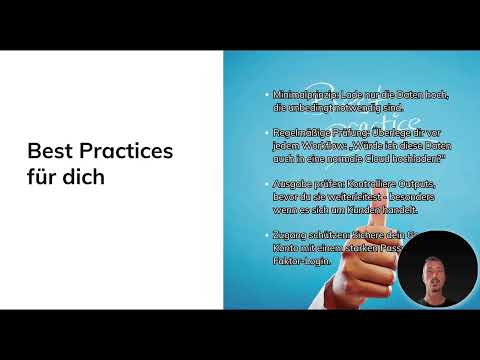
Step 7: Securing Your Google Account
A strong, unique password is the foundation. Be sure to supplement it with two-factor authentication, for example via your phone. Even if someone gets hold of your password, they won't gain access to your workflows without the second confirmation. Setup takes only a few minutes and noticeably increases security.
Step 8: Apply the principle of data minimization
Upload only the data that is absolutely necessary for the workflow. Every additional piece of information increases the risk, but often brings no real added value. Think in advance about which fields are actually needed, and leave out everything else.

Step 9: Ask the cloud question before every workflow
Make it a habit to answer a simple question before uploading: Would I also upload this data to a regular cloud? If your answer is hesitant, don't upload the data, or revise it first. You should repeat this check regularly, especially when the nature of your data changes.
Step 10: Check results before you share them
AI-generated outputs are not automatically correct or harmless. Check every result before you send it or process it further, especially when customer data is involved. This prevents incorrect or unintentionally sensitive content from getting out.
Step 11: Understand responsibility and observe legal limits
Technical protection alone is not enough. Google does not assume legal responsibility for data protection in your workflows. That lies with you as the user. If you work with particularly sensitive data, check the legal requirements of your company or industry in advance. Data protection is therefore a shared task between you and the tool, in which you bear the final decision.

Summary – Google Opal Data Protection: Building Secure Workflows Correctly
Google Opal offers a solid security foundation, but responsible handling of data is up to you. Stick to the principle of data minimization, work with test data, check results, protect your account with two-factor authentication, and clarify legal questions before you process personal data. The next step covers use cases, templates, and the possibilities for automation. There you can apply what you've learned directly.
FAQ
Does Google Opal run locally on my computer?No, Opal is a cloud-based tool, and the workflows run on Google's servers.
Is my data in Opal automatically protected?Data transmission is encrypted via HTTPS and storage takes place in Google's infrastructure. However, a careful selection of inputs and a well-secured account remain necessary.
Can data in Opal be used for AI training?In part, yes. Therefore, before every input, check whether you agree to such processing.
Which data should I better not upload?Sensitive data such as customers' personal information, confidential business data, internal documents, or financial data.
Does Google take responsibility for data protection?No, the responsibility lies with you as the user. Check the legal framework of your company.
What is the best way to protect my account?With a strong, unique password and two-factor authentication.

