
Imagine you ask a colleague for a product description and only say: "Write something about the shoe." The result will probably turn out fairly arbitrary. The same thing happens with an AI when its instruction is too vague. In Google Opal, prompts play exactly this role. They are the instructions you give the AI within your workflow, and they largely determine what comes out at the end. In this tutorial, you will learn what makes up a prompt, how to build one, and how to use it directly in Opal.
The video is only loaded from YouTube when you play it – data (including your IP address) is then transmitted to YouTube/Google. More in the privacy policy
Key Takeaways
A prompt is an instruction in natural language. A good prompt usually consists of three parts: the task, the context, and the desired format. The quality of your prompt directly determines the quality of your entire workflow. You don't need any programming skills for this, and even small changes in wording can lead to significantly different results.
Step-by-Step Guide
Step 1: What a Prompt Actually Is
A prompt is basically nothing more than a command or request that you phrase in completely normal language. So you don't have to learn any technical jargon. Typical examples are "Summarize this text in three sentences," "Create a social media post from these bullet points," or "Analyze this customer inquiry and provide a suitable response." The prompt gives the AI its direction and acts as a control lever for your entire process.

Step 2: Why the Wording Is So Crucial
An unclear prompt often leads to imprecise results because the AI has to guess what you actually want. A precise, well-phrased prompt, on the other hand, reliably delivers usable outputs. This has consequences for your workflow: if a step in Opal produces faulty text, those errors end up in the subsequent steps as well. Prompt design is therefore a core skill when working with Google Opal, because this is where it is decided whether your workflow runs reliably.

Step 3: Getting to Know the Structure of a Good Prompt
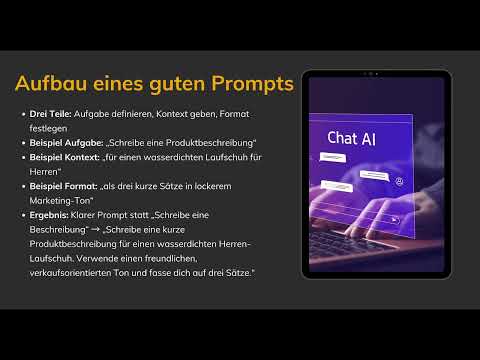
A good prompt usually consists of three building blocks. The first is the task, that is, the question of what the AI should specifically do. The second is the context, which describes what the task relates to. The third is the format, which determines the form in which you want the result. If you take all three parts into account, a vague request becomes a clear instruction.

Step 4: Clearly Defining the Task
Start by clearly specifying what the AI should do. A sentence like "Write a product description" is a good starting point. Make sure the verb is unambiguous. "Write," "summarize," "translate," or "analyze" are clear instructions for action, whereas phrases like "Take care of the text" leave open what exactly is expected.
Step 5: Adding the Context
In the next step, you tell the AI what the task relates to. "Write a product description" thus becomes "Write a product description for a waterproof running shoe." The more relevant information you provide, the more targeted the AI can work. This includes, for example, the target audience, the product, or the features that matter.
Step 6: Specifying the Desired Format
The last building block is the format. Here you specify what the result should look like, for example as three short sentences in a casual marketing tone. Tonality also belongs in this area. With details like "friendly and sales-oriented" you control the style, and with "in three sentences" you limit the length. Without such guidelines, the AI decides for itself, and the result is often longer or different from what you need.
Step 7: Putting Together a Complete Prompt
Now you put all three parts together. The simple request "Write a description" thus becomes a clearly structured prompt: "Write a short product description for a waterproof men's shoe. Use a friendly, sales-oriented tone and keep it to three sentences." The difference from the first attempt is clear, even though only the wording has changed.
Step 8: Using the Prompt in Opal
In Opal, you insert your prompts directly into the logic steps. Every step that uses the AI gets its own instruction. You can open, adjust, and test the prompts again at any time. You don't need to program for this, because the prompt in natural language is enough to explain to the AI what you need.

Step 9: Test and Improve Prompts
The last step is the most important, because a prompt rarely comes together on the first attempt. Start your workflow, check the result, and adjust the prompt in a targeted way. A small change, such as adding a length specification or a target audience, can noticeably improve the result. In this way, you will learn over time how to control the outputs through language. In the next step of this module, exactly this is practically worked through in a simple workflow.
Summary – Formulating Prompts Correctly in Google Opal
Prompts are the instructions you use to control the AI in Google Opal. A good prompt states the task, provides the necessary context, and defines the format. Because the quality of your prompts determines the quality of your workflow, it is worth testing and refining your wording in a targeted way. For this, you don't need programming skills, just the willingness to choose your words consciously.
FAQ
What is a prompt in Google Opal?A prompt is an instruction in natural language that you use to tell the AI within an Opal workflow which task it should perform.
Do I need to know how to program to write prompts?No. A prompt is written in completely ordinary language; programming skills are not necessary for it.
What parts should a good prompt consist of?A good prompt usually consists of three parts: the task, the context, and the desired format.
Why does the prompt influence the quality of my workflow?The results of one step flow into the following steps. Imprecise prompts therefore lead to imprecise outputs that carry on throughout the entire workflow.
Where do I insert prompts in Opal?You insert prompts directly into the logic steps that use the AI.
Can I change prompts afterwards?Yes, you can adjust, test, and improve prompts at any time.

