
If the If-Else statement in the Agent Builder has mostly confused you so far, you're not alone. Many beginners don't struggle with the interface, but with the comparison rules: Why does a condition suddenly not work? Why is a number recognized as text? This guide takes you from the basic idea of an if-then query to a small practical example in which a classifier assigns requests to a suitable agent. You don't need any programming knowledge for this. However, you should pay close attention to spelling and data types, because that's exactly where most errors occur.
The video is only loaded from YouTube when you play it – data (including your IP address) is then transmitted to YouTube/Google. More in the privacy policy
Key Takeaways
- The If-Else statement is an if-then query: If the condition is met (true), the first branch runs; otherwise (false), the second one does.
==only compares the value, while===also compares the data type. A number 5 and a text "5" are not equal for===.- For stable queries, you should deliberately define the classifier's output type, ideally as JSON with Boolean, Enum, Object, or Array.
- Boolean values (true/false) and enums (fixed selection lists) are particularly reliable because the agent may only return these values.
- A branch that is too general, such as a support branch, can catch all requests and make other branches unreachable.
Step-by-Step Guide
Step 1: Create a new agent
Start on the home page of the Agent Builder. There you will find the sections Workflow, Drafts, and Templates. Select "Create a new workflow" and start the workflow. You will then land in the start area with the first agent. This starting point forms the basis for all the following building blocks, so it's worth naming it clearly so that you keep track later.

Step 2: Understand the basic principle of the If-Else statement
At its core, the If-Else statement is an if-then query. If the condition is met, it returns true, and the workflow follows the first branch. If the condition is not met, it returns false, and the second branch runs. This second branch does not necessarily have to contain another agent. You can also simply let the process end if no condition applies. Imagine the building block like a switch on a railway track: Depending on its state, the train travels in a particular direction.

Step 3: Set up the condition
Insert the statement into your workflow via "Create a condition to branch your workflow". The name of the condition is optional, but give it one anyway. A name like "Is met" or "Number is five" shows you at a glance later which condition the node checks. Then you define the input value. In the input field, an input of type Text usually appears, coming from the previous agent. So the agent delivers its output text, and the condition checks this text against your specification.

Step 4: Check equality with == and ===
The operator == compares two values for equality. If the input value is 5, the "true" branch is executed. The operator === is stricter: It checks not only the value but also the type. This means that a numeric 5 and a string "5" are different for ===. So if your agent delivers a number as text, a condition with === will not be met, even though the content looks the same. Therefore, when writing comparisons, pay close attention to the types that are actually passed.


Step 5: Use further operators and logical combinations
Besides equality, further comparison operators are available to you. With != you check inequality, and with !== strict inequality including type. There are also the greater-than and less-than signs as well as their variants with equality. You can also combine these operators logically, for example to check whether a value is greater than nine. It's best to create this overview as a cheat sheet, since you'll need it regularly when building more complex queries.

Step 6: Add More Branches
An If-Else node doesn't have to stop at two possibilities. You can add more parameters using the "Add" button. In the example, a second input value of type String is checked with the condition == 4. This creates multiple branches: at 4 one agent runs, at 5 another, and all other values lead to the Else branch. Plan the order of the branches carefully, because you should always check specific conditions before general ones.

Step 7: Configure the Classifier with an Instruction
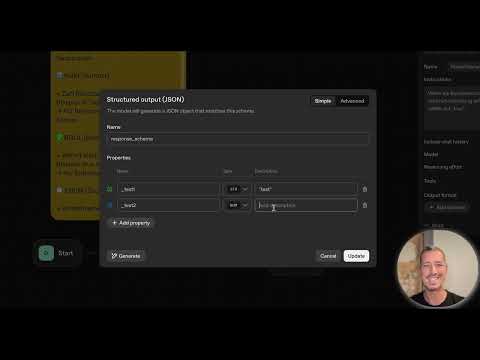
For more complex cases, you need a classifier. This agent analyzes the user message and returns a structured result. In the "Instruction" field, you state clearly what should be checked. One example is: If the user message requires an internet connection, set the result to true. By default, the Output Format is set to Text. For reliable queries, however, you should switch to JSON, since you can then define the data types yourself.


Step 8: Define Data Types in the JSON Schema
In the JSON schema, you define properties that the classifier returns. The available types are String, Number, Boolean, Enum, Object, and Array. A String is a character string, a Number is a number. A Boolean can only be true or false, and that is exactly why it is so reliable for yes/no decisions. An Enum limits the answer to predefined values, such as car, airplane, or bus. An Object bundles several properties such as name and age in one wrapper. An Array is a container for multiple elements. The query can never recognize any values that are not in the list as true.


If creating objects is too tedious for you, you can describe a prompt in plain language using the generator. The assistant creates the appropriate structure for you. However, always check the result before you use it.

Step 9: Build a Practical Example with Internet Search
In the first practical example, the classifier should decide whether a request requires an internet connection. To do this, you create a property of type Boolean in the JSON schema, for example with the name "web_update". Then you add the condition in the If-Else statement: Input-Output-Text equals true. If the condition is met, you run a search agent, for example for weather data. Otherwise, you fall back on information that is in the model or in your own files. In the Evaluate section, you can follow the run and check the runtimes.


Step 10: Test a Practical Example for an Online Shop
In the second example, you classify customer inquiries from an online shop into categories such as support request, product inquiry, praise and criticism, and job inquiry. You describe these categories in the classifier's Instruction and then connect several If-Else branches, each with a target agent. A test run with a job inquiry shows you whether the assignment works. Watch out for one weak point: the support branch easily catches all requests that don't fit any other category. One solution is to define the support branch as a catch-all and to formulate the classification of the remaining categories as precisely as possible.


Summary ??? If-Else Logic in the Agent Builder: How to Build Decision Trees Step by Step
The if-else statement is the heart of every decision tree in the Agent Builder. You use comparison operators to determine which branch is executed, and with a structured JSON schema you ensure that the inputs have exactly the data types you expect. Boolean and enum values in particular give you reliable results. Pay attention to the difference between == and ===, formulate your classification precisely, and test every branch with real examples before you use the workflow in everyday operations.
FAQ
What is the difference between == and ===?With == only the value is compared, while with === the data type is compared as well, so the number 5 and the text "5" are not considered equal.
Why should I switch the output format to JSON?With JSON you define data types such as Boolean, Enum, or Number, which makes the query more reliable and more accurate than with plain text.
What happens if no condition is met?Then the else branch runs, and you can either integrate another agent or have the workflow end directly.
Why is a Boolean value so reliable?A Boolean can only be true or false, so no unexpected intermediate forms such as "true " with a trailing space arise that would disrupt the query.
How do I prevent all requests from ending up in support?Formulate the classification of the other categories precisely and use the support branch only as a catch-all for requests that clearly cannot be assigned to any other category.
Can I make decisions with multiple conditions?Yes, you can add more parameters and create multiple branches, whereby specific conditions should always be checked before general ones.
