
Before you start your first project in Google Opal, it's worth taking a look at the path ahead. This guide shows you what you will be able to do at the end of the course, how the modules build on each other, and which stages lead you from beginner to independent developer of automations. You don't need any programming experience for this. Curiosity about logical connections is entirely enough.
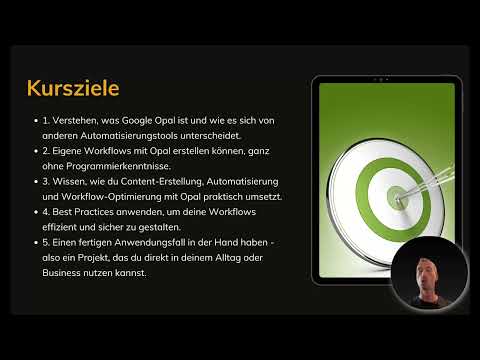
The video is only loaded from YouTube when you play it – data (including your IP address) is then transmitted to YouTube/Google. More in the privacy policy
Key Takeaways
Key Takeaways
- Google Opal enables you to build workflows entirely without programming knowledge.
- Every workflow consists of the three building blocks Inputs, Logic Steps and Outputs.
- The course is divided into seven modules that build on each other logically.
- Your goal is a finished project that you can use directly in everyday life or in business.
Step-by-Step Guide
Step 1: Open the chapter Course Goals and Learning Path
This chapter provides orientation for everything that follows. Take a moment to understand the goals and structure of the course before you get started hands-on. If you want to assess your progress later, this very overview will help you.

Step 2: Build your understanding of Google Opal
By the end of the course, you will know exactly what Google Opal is. This knowledge forms the basis for all further decisions, such as which tasks you want to automate and which tools are suitable for them.

Step 3: Recognize how it differs from other automation tools
Many automation solutions look similar at first glance. In the course, you will learn how Google Opal differs from them. This way you can better assess when using it is worthwhile.
Step 4: Create your own workflows without programming
The central promise of the course is that you develop your own workflows without having to write code. No technical prior knowledge is necessary for this. You work step by step with the tools that Opal provides you.
Step 5: Create content and optimize processes
One part of the course is devoted to the question of how you create content and improve your automations. You learn to design workflows so that they run reliably and can be adapted when needed.
Step 6: Apply best practices for secure and efficient workflows
So that your workflows not only work but also remain secure and clear, the course teaches proven approaches. These rules will save you a lot of correction work later.
Step 7: Work toward a finished use case project
At the end, there is a concrete project that you can integrate directly into your everyday life or use professionally. This practical orientation makes the course especially valuable for getting started.
Step 8: Understand the structure of the course in seven modules
The course is divided into clearly defined modules. Each module takes you one step further, so that you can follow your learning progress at any time.

Step 9: Work through Module 1 on the introduction and overview
The first module is rather theoretical. You get to know the basics that you need for all further steps. Feel free to take your time here, because a solid foundation makes everything that follows easier.
Step 10: Get to know the interface of Google Opal
In the second module, you turn to the user interface. You find your way around, recognize the most important areas, and gain confidence in using the tool.
Step 11: Understand the basics of workflows
Module three explains the heart of every automation: Inputs, logic and outputs. These three building blocks interlock and form the structure of every workflow.
Step 12: Create your first own workflow step by step
In the fourth module, you rebuild your first own workflow directly on screen. Here you combine the three building blocks into your first working process.
Step 13: Discover Advanced Features and Practical Examples
The fifth module deepens your knowledge. You will learn about additional features and apply them to realistic examples so you can see their benefits right away.
Step 14: Deepen Your Knowledge of Tips, Tricks, and Best Practices
Module six collects practical tips from everyday work. These tricks help you implement workflows faster and more cleanly.
Step 15: Implement the Final Project
In the seventh module, you develop your own project to show what you have learned. At the end, there is also an outlook on further possibilities.
Step 16: Understand the Logical Structure of the Modules
Each module builds on the previous one. As a result, your confidence grows step by step until you can develop complex automations on your own.
Step 17: Capture the Roadmap for the Entire Course
The overview of all modules serves as your guide. You always know what to expect and what you can look forward to.
Step 18: Get Started in Practice with the User Interface
The next module goes straight into practice. You will take a detailed look at the user interface of Google Opal. This is where your first concrete work step in the tool begins.
Summary – Google Opal: Course Goals and Learning Path at a Glance
The course shows you how to build your own workflows in Google Opal from the building blocks Inputs, Logic Steps, and Outputs, without having to program. In seven modules, it takes you from the basics through the interface to your own final project. If you work through the modules in order, you build confidence step by step and end up with an automation you can use right away.
FAQ
Do I need programming skills for Google Opal?No, the course is designed so that you can create your own workflows without programming skills.
What building blocks does a workflow in Google Opal consist of?A workflow consists of Inputs, Logic Steps, and Outputs that are connected to each other.
How many modules does the course include?The course includes seven modules that build on each other logically.
When do I start with my own workflow?You create your first own workflow in the fourth module, step by step on screen.
What is the goal of the course?At the end, you will have a finished project that you can use in everyday life or in business.

