
The use of CSS in HTML documents significantly expands your possibilities for designing websites. Internal styling, also known as internal stylesheets, provides you with an effective method to control the presentation of your content in a targeted manner. In this guide, you will learn everything important about internal stylesheets, including how they work and their practical applications.
The video is only loaded from YouTube when you play it – data (including your IP address) is then transmitted to YouTube/Google. More in the privacy policy
Key Insights
- Internal stylesheets help bring order to large HTML documents.
- They allow for centralized adjustment of the design of various elements.
- CSS selectors are crucial for targeted styling of HTML elements.
Step-by-Step Guide to Internal Stylesheets
To create an internal stylesheet, here are the individual steps that will help you understand and apply the basics.
1. Basic Understanding of the Issue
Imagine you are working on a large HTML document with hundreds of lines. If you use inline styles everywhere, it quickly becomes unmanageable. For this reason, it makes sense to use internal stylesheets. This way, you keep track of the styling elements and can make changes centrally.

2. Defining an Internal Stylesheet
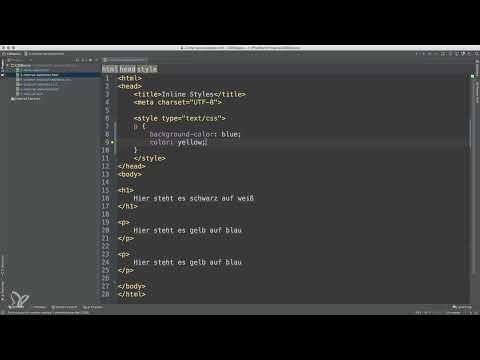
To create an internal stylesheet, place a <style> tag within the <head> section of your HTML document. The type of stylesheet is specified with type="text/css". This makes it clear to the browser that you are inserting CSS here.

3. CSS Instructions in the Stylesheet
This looks like this: Once the <style> tag is defined, you can add your CSS instructions. For example, start with styles for paragraphs (<p> tags). By using the HTML tag as a selector, you can specify how all <p> elements should look.

4. Creating Example Styles
Let's say you want to change the background color of your paragraphs and affect the font color.
Here, the background of the paragraphs is blue and the font color is yellow. These instructions apply to all paragraphs in your document.
5. Applying Styles to Multiple Elements
Now, when you add more paragraphs, the defined styles continue to apply. It doesn't matter where in the document the paragraphs appear; they always follow your defined styles.

6. Using Other Tag Selectors
In addition to paragraphs, you can also target other HTML elements.
This will display the font color of your main heading in red.
7. Applying Special Selectors
CSS offers you a variety of selectors. For example, if you want to style only the paragraphs within a specific container, you can do this using class or ID selectors.

8. In-Depth Look at CSS Selectors
There are many different selectors you can use to target your styles. Understanding these selectors is crucial to applying CSS effectively. For example, you can also use combinable selectors or pseudo-classes to refine your design even further.

Summary – Internal Stylesheets in HTML: A Step-by-Step Guide
Internal stylesheets are a practical tool for controlling the visual aspects of your HTML documents. Through centralized management of the styles, you can ensure that your design remains consistent and appealing without losing track of your styles.
Frequently Asked Questions
How do I create an internal stylesheet?Add a <style> tag in the <head> section of your HTML document.
What is the difference between internal and external stylesheets?Internal stylesheets are included directly in the HTML document, while external stylesheets are stored in separate CSS files.
Can I have multiple internal stylesheets in one document?Yes, you can use multiple <style> tags in the <head> section, but it is advisable to consolidate the styles into a single one.
How do CSS selectors affect styling?CSS selectors determine which HTML elements are targeted and thus styled.


