
Imagine describing in a single sentence which small app you need, and shortly afterwards a working process is right in front of you. This is exactly the promise behind Google Opal. The tool is still young, but it is already exciting for anyone who wants to automate recurring tasks without writing a single line of code.
The video is only loaded from YouTube when you play it – data (including your IP address) is then transmitted to YouTube/Google. More in the privacy policy
In this guide, you will learn what Google Opal is, where it comes from, and where it fits in the market. You will find out how it differs from well-known automation platforms and why the connection with Google services is so practical. By the end, you will know what matters when building workflows and how to sensibly continue with the course.
Key Takeaways
- Google Opal is a no-code automation tool from Google Labs that lets you create small, AI-powered mini-apps and workflows.
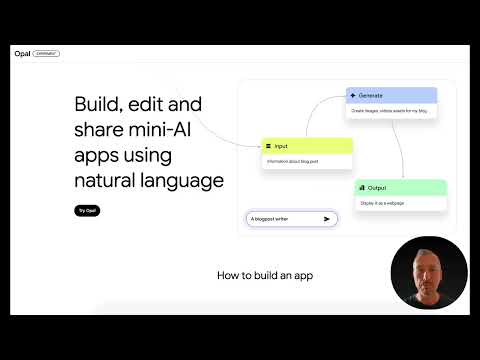
- You describe in plain language what you want to build, and Opal automatically turns it into a workflow.
- Compared to tools like N8N, Zapier, or Make, Opal requires significantly less technical knowledge and relies more heavily on artificial intelligence.
- The close integration with Gmail, Drive, Docs, Calendar, and Gemini makes Opal particularly attractive for anyone who already works in the Google world.
- Workflows consist of inputs, logic steps, and outputs. If you understand these building blocks, you can develop your own stable processes.
Step-by-Step Guide
Step 1: Understanding Opal as a No-Code Tool
The term "No Code" means that you create applications without programming. With Opal, this happens through a visual interface: you work with building blocks and descriptions instead of source code. Opal is thus explicitly aimed at beginners as well as technically savvy users. If you have ever built a form or linked a spreadsheet with formulas, you already bring the most important mindset.

Step 2: Comparing Opal with N8N and Other Platforms
Well-known automation tools like N8N, Zapier, or Make work with a similar basic principle, but usually require many technical settings. You have to configure connections manually, map data fields, and keep an eye on sources of error yourself. N8N can explain to you how something works with the help of artificial intelligence, but the implementation remains your responsibility. Opal takes a different approach: the system handles a large part of these steps itself, so you can concentrate more on the result.
Step 3: Understanding the History of Opal
Google first introduced Opal as a beta version in 2024. The basic idea was to create a tool that resembles well-known platforms but is significantly easier to use and relies even more on AI. While classic tools often require extensive settings, Opal is meant to make the setup so intuitive that the work feels almost like a conversation. The fact that Opal comes from Google Labs shows the experimental nature of the project. You should therefore expect features to continue evolving.
Step 4: From Conversation to Finished Workflow
The heart of Opal is the implementation of your description. Suppose you want an app that summarizes your meeting notes and saves them as a PDF. You formulate this goal in completely normal language, and Opal builds the workflow step by step. Sometimes you additionally need API interfaces or other access credentials, which you have to enter afterwards. However, the core of the workflow is in place after just a few minutes.
Step 5: Knowing the Building Blocks of a Workflow
Every workflow in Opal can be broken down into three areas. At the beginning is the input, that is, the information with which your process starts, such as a text, a file, or a message. Next come the logic steps, which determine what happens to this data, for example summarizing, translating, or sorting. At the end is the output, the result you receive, such as a document, an email, or an entry in a spreadsheet. If you ask these three questions for every new automation, you avoid unclear processes and build workflows that function reliably.
Step 6: Understanding Opal's Positioning
Opal promises above all one thing: easy operation without programming and without complicated interfaces. Everything runs through a visual interface, and the steps are supported by AI. This clearly positions Opal as a beginner-friendly automation tool that bridges artificial intelligence, productivity, and everyday workflows. Whether for business, personal projects, or private tasks: Opal is aimed at anyone who wants to get their work done faster.
Step 7: Using the Benefits of Google Integration
A key advantage of Opal lies in its connection to the Google ecosystem. The tool combines well with Gmail, Google Drive, Docs, Calendar, and Gemini. If your appointments are in the calendar, your documents in Drive, and your communication runs through Gmail, many elaborate connections become unnecessary. Especially for teams that already work with Google Workspace, this is a real time saver.
Step 8: Identify Areas of Application
Opal can be used in three main areas: automating recurring tasks, creating content, and optimizing existing workflows. This means you can take over routine tasks, generate texts and summaries, or make existing processes leaner. The introduction deliberately remains theoretical so that you understand the foundation before you begin the practical setup.
Step 9: Follow Along with the Course in Practice
The course is designed so that you can follow every step on screen. Starting with the second module, we get straight into practice. It's best to start taking notes now on the aspects that are important for your own projects. If you already have a specific idea, such as a summary of your meetings or an automatic filing system for your documents, write it down right away. With this preparation, getting started in the next modules will be much easier for you.
Summary – Google Opal: No-Code Automation Explained Simply
Google Opal is a young no-code tool from Google Labs that enables automations through natural language. You describe your goal, and Opal builds the appropriate workflow. Compared to N8N, Zapier, or Make, it is easier to use and more strongly focused on AI. The close integration with Gmail, Drive, Docs, Calendar, and Gemini makes it especially useful for anyone working in the Google ecosystem. Every workflow consists of inputs, logic steps, and outputs, and you should always keep exactly this structure in mind for your own projects.
FAQ
What is Google Opal?Google Opal is a no-code automation tool from Google Labs that lets you create small AI-powered mini-apps and workflows without programming.
When was Google Opal introduced?Google first introduced Opal in 2024 as a beta version.
Do I need programming skills for Google Opal?No. You describe in natural language what you want to build, and Opal automatically turns it into a workflow.
How does Opal differ from N8N?N8N does offer AI support with explanations, but the implementation is still up to you. Opal takes care of a large portion of the steps itself and is therefore more beginner-friendly.
Which Google services can be used with Opal?Opal works well with Gmail, Google Drive, Docs, Calendar, and Gemini.
What does a workflow in Opal consist of?A workflow consists of three building blocks: inputs, meaning the starting data; logic steps that process this data; and outputs, meaning the results.
Do I always have to configure everything manually in Opal?Not necessarily. The workflow is largely created automatically. Sometimes, however, you have to enter API interfaces or credentials afterwards.
What tasks is Opal suitable for?Opal is suitable for automating recurring tasks, creating content, and optimizing existing workflows.

