
After Effects for beginners

- Get to know and understand After Effects
- Basics, tools, animation, 3D, effects and co.
- For optimal understanding including project files
- Perfect for beginners
From the first steps to the credits, after this training you will have the cutting edge for the perfect edit. Then it's no longer After Effects for beginners, but After Effects for professionals.
78 Videos, 1106 minutes
Innovations in AE CC
What's new in the Creative Cloud: After Effects CC (until 2015) - Welcome to the Creative Cloud
13 minWelcome to the Creative Cloud! Learn how to use the Cloud, what it has to offer you and what you need to pay attention to as a Creative Suite user. Everything summarized in a factual and easy-to-understand video training.
What's new in the Creative Cloud: After Effects CC (until 2015) - The new functions and their benefits
18 minFind out in this video training whether the switch to CC is worthwhile for you! Some new changes are listed here in comparison to After Effects CS6.
What's new in the Creative Cloud: After Effects CC (until 2015) - CINEWARE & 3D tracking
15 minGet to know the new plug-in "Cineware", which allows you to add 3D elements to your compositions in After Effects CC!
What's new in the Creative Cloud: After Effects CC (until 2015) - Pixel motion blur
4 minGet to know the new pixel motion blur function, which activates motion blur in the pixel areas, resulting in a much more detailed overall image.
What's new in the Creative Cloud: After Effects CC (until 2015) - Extended cropping options
9 minGet to know the new key support plug-in "Enhance Soft Mask" included in After Effects CC, which brings enhanced and improved keying parameters.
What's new in the Creative Cloud: After Effects CC (until 2015) - edge refinement tool
9 minPresentation of the new edge refinement tool in After Effects CC in connection with the Roto Brush tool.
What's new in the Creative Cloud: After Effects CC (until 2015) - Warp Stabilization VFX
9 minGet to know the new "Warp Stabilization VFX" plug-in, which was created for various purposes. You can find an example in this video training.
Innovations in AE CC 2015
What's new in the Creative Cloud: After Effects CC 2015 (June 2015) - The new look
12 minExperience the new look of After Effects CC 2015, get insights into the new user interface and learn what has changed at a glance.
What's new in the Creative Cloud: After Effects CC 2015 (June 2015) - Use Adobe Stocker
11 minAdobe now offers its own Stocker function. This can be linked and used directly with After Effects. You will get to know the Stocker menu and the Kuler implementation in more detail.
What's new in the Creative Cloud: After Effects CC 2015 (June 2015) - Expression error message
8 minThe new version of After Effects 2015 introduces error messages for expressions, which help you to localize and easily solve an error in the middle of an expression.
What's new in the Creative Cloud: After Effects CC 2015 (June 2015) - Preview functions
12 minA new, even more powerful and beneficial preview feature has been implemented in After Effects CC 2015. Learn how to use it effectively!
What's new in the Creative Cloud: After Effects CC 2015 (June 2015) - Removed functions
8 minNot only are functions added, but functions are also temporarily deactivated or completely removed. Get an overview of which functions have had to make way for the new version of After Effects 2015.
What's new in the Creative Cloud: After Effects CC 2015 (June 2015) - Learning to understand HiDPI
14 minAfter Effects 2015 has been flattened to display on high-resolution displays to ensure a better and more readable interface and to prevent display errors. Take a look at some examples in this video training and learn exactly how this technique works.
What's New in the Creative Cloud: After Effects CC 2015 (June 2015) - Independent Ram Preview
11 minThe ram preview has been reworked as a process and separated from After Effects 2015. It is now an independent process that can be controlled intuitively. Get to know the new possibilities.
What's new in the Creative Cloud: After Effects CC 2015 (June 2015) - Facetracking
16 minA new function has been implemented in After Effects, called face tracking. It allows you to track faces so that you can edit them later. Take a look at how face tracking works.
What's new in the Creative Cloud: After Effects CC 2015 (June 2015) - Character Animator - Overview
21 minAfter Effects 2015 comes with a new tool, the Character Animator CC. With this tool, you can create animations of puppets that you design and animate yourself beforehand. Get an overview of this program.
What's new in the Creative Cloud: After Effects CC 2015 (June 2015) - Character Animator - Create a character
21 minLearn how to create a new puppet with the help of existing puppets, modify it and make it ready for animation.
What's new in the Creative Cloud: After Effects CC 2015 (June 2015) - Character Animator - Animating characters
20 minOnce you have created your doll, it's time to learn how to breathe life into it using various tools and methods.
What's new in the Creative Cloud: After Effects CC 2015 (June 2015) - Character Animator - Export character
8 minOnce the character has been animated, it's time to export it in a format that can be read by After Effects or other programs. Here you will learn how to do this.
Innovations in AE CC 2015.1
What's new in the Creative Cloud: After Effects CC 2015.1 (November 2015) - Overview of the November update
18 minA lot has happened. In November, there are once again numerous new features in After Effects CC 2015. Get to know them and take advantage of them.
What's new in the Creative Cloud: After Effects CC 2015.1 (November 2015) - Adobe Stocker innovations
9 minWith the November update of After Effects, Adobe Stocker has been integrated into After Effects. Get to know the innovations and features in more detail.
What's new in the Creative Cloud: After Effects CC 2015.1 (November 2015) - The workspace bar
8 minGet to know the new workspace bar, which you can use to set up and customize your workspace.
What's new in the Creative Cloud: After Effects CC 2015.1 (November 2015) - New caching behavior
7 minAfter Effects now uses many improved techniques for caching behavior, which has been completely revised. In this training course, you will get to know the new features in more detail.
What's new in the Creative Cloud: After Effects CC 2015.1 (November 2015) - Improvements in the preview window
12 minIn the new version of After Effects, the preview window and how it works have also been revised. Find out what has changed.
What's new in the Creative Cloud: After Effects CC 2015.1 (November 2015) - Import options for modern formats and codecs
15 minIn addition to many familiar formats, new formats that are natively supported can now also be imported. This allows new clips to be dragged into After Effects, which are immediately available for post-processing without any annoying waiting.
What's new in the Creative Cloud: After Effects CC 2015.1 (November 2015) - New scripting functions
5 minNew script functions have been released and some bugs have been fixed. Find out how scripts work and what's new.
What's new in the Creative Cloud: After Effects CC 2015.1 (November 2015) - Import clips with Lumetri Color
17 minLearn about the Color Lumetri plug-in for color grading available in Premiere CC and After Effects CC and how to use it.
What's new in the Creative Cloud: After Effects CC 2015.1 (November 2015) - Improved and new plug-ins
17 minWith the new version of After Effects, new plug-ins have been added and a very powerful color grading tool has been revised. In this lesson you will learn all about it.
What's new in the Creative Cloud: After Effects CC 2015.1 (November 2015) - Overview of what's new in Character Animator 3
24 minThe Character Animator program, which has recently been added to After Effects, has been upgraded, localized and revised. Get to know all the relevant new features.
What's new in the Creative Cloud: After Effects CC 2015.1 (November 2015) - The stiffening tool
6 minThere is a new tool that comes into play in Character Animator 3. This is the stiffening tool. Learn how to use it on your puppet and how it works.
Fundamentals and system interface
After Effects for beginners: The basic concept of After Effects
21 minWondering what you can do with After Effects? Here is the answer.
After Effects for beginners: Getting to know and customizing the system interface
24 minThis video training will teach you how to interact with the system interface and the basic tools in After Effects.
After Effects for beginners: Further functions and their significance
30 minGet to know another important part of the options available to you in After Effects.
After Effects for beginners: Further functions and their meaning II
31 minGet to know another important part of the options available to you in After Effects.
After Effects for beginners: Creating a new project
16 minIn this lesson, you will learn how to create a new project and carry out all the necessary steps. You will also learn how to make After Effects CC perform even better.
After Effects for beginners: The basics of animation
14 minWhat is an animation? How does it work? What do I need to consider? All these questions are covered in this video training.
After Effects for beginners: The types of animations
11 minWhat types of animations are there? How can I create them? Can After Effects create them too? Find out for yourself!
Interesting facts
After Effects for beginners: Rendering with a compressed alpha channel
7 minLearn how to deal with compressed alpha channels and how to create them yourself.
After Effects for beginners: Interlacing
7 minWhat does interlacing mean? Where is it used? What do I have to watch out for?
You can find out how to deal with interlacing in this video training.
After Effects for beginners: Frame rate
11 minHow do the frames per second actually work? Here you can get an answer to this all-encompassing question.
After Effects for beginners: Common formats
12 minHere you can find out which formats are available, how they are used and what you need to pay attention to when creating them.
After Effects for beginners: Data synchronization
14 minAdobe CC allows you to upload your projects to the cloud and use them from anywhere. Learn in this video training how synchronization works and what you need to keep in mind.
After Effects for beginners: Explanation of Adobe Bridge
18 minThe Adobe Bridge is a kind of link between the individual CC apps. Learn how to use this powerful program and how to take advantage of it.
After Effects for beginners: Animation presets in Bridge
14 minWith the Bridge, it is possible to browse through the presets offered in After Effects before you use them. Here you will learn how this is possible.
After Effects for beginners: Creating and using animation presets - Part 01
18 minCreate animation presets and learn how to render and reuse them. In this video training you will learn how to create a futuristic belly band, which you render and save as a preset.
After Effects for beginners: Creating and using animation presets - Part 02
15 minCreate animation presets and learn how to render and reuse them. In this video training you will learn how to create a futuristic screen, render it and save it as a preset.
After Effects for beginners: Creating and using animation presets - Part 03
15 minCreate animation presets and learn how to render and reuse them. In this video training you will learn how to create a futuristic panel, render it and save it as a preset.
After Effects for beginners: Masks and their meaning - Part 01
20 minIn this video training you will learn what masks are, how you can work with them and how to create them. This is part 01 of 02.
After Effects for beginners: Masks and their meaning - Part 02
13 minIn this part, you will learn what masks are, how you can work with them and how to create them.
This is part 02 of 02.
After Effects for beginners: Workflow tips
17 minHere I explain how you can save time when working. I cover folder structures and layer structures and use a project to show you how the workflow should ideally look.
Settings and technology
After Effects for beginners: Installing and using plugins
11 minThe strength of After Effects lies in its extensibility: you have the option of installing third-party plugins that add powerful functions to the program. In this video training you will learn how to do this.
After Effects for beginners: Learning to assign hotkeys
19 minAfter Effects also offers the option of assigning your own hotkeys. Unfortunately, there is no implementation of an editor for this. You have to load a script and follow certain rules to be able to change your keys. I will explain how this is possible.
After Effects for beginners: Effects in connection with editing
10 minIf you're not working with Premiere in conjunction with After Effects, you may find it difficult to understand how to combine After Effects effects with your editing projects. Here you can find out how.
After Effects for beginners: Formats & Rendering
27 minWith the Media Encoder CC, it is even possible to render your projects outside of the After Effects CC environment and choose from many existing presets - even without starting After Effects. In this video training you will learn how to do this.
Effects and tools
After Effects for beginners: Working with effects and their explanation
16 minUse predefined effects, also known as plug-ins, to achieve your desired goal. Effects can also be created without plug-ins. Learn how to do this in this lesson.
After Effects for beginners: Keying & Alpha & Luma
16 minThere are many more techniques to create special effects and transitions. Learn advanced techniques to create unique looks and transitions.
After Effects for beginners: Time manipulation of clips
9 minAfter Effects CC offers a wide range of time-manipulative effects that can turn your clip into something special with just a few clicks. Here I will cover the procedure using these effects.
After Effects for beginners: Audio functions and their benefits
8 minIn addition to visual effects, After Effects CC allows you to make small corrections to audio clips. I'll show you where to find them and how to use them.
After Effects for beginners: Getting started with Expressions
10 minA lot of time can be saved with Expressions, but even complex effects are only possible with Expressions. It is also possible to automate expressions. You will learn how to use both in this video training.
After Effects for beginners: Mocca in After Effects
16 minWith Mocca, you get another very powerful tool in After Effects CC, with which you can track complex scenes and get the best possible result from After Effects. Learn how to use the program to attach a layer using corner pins.
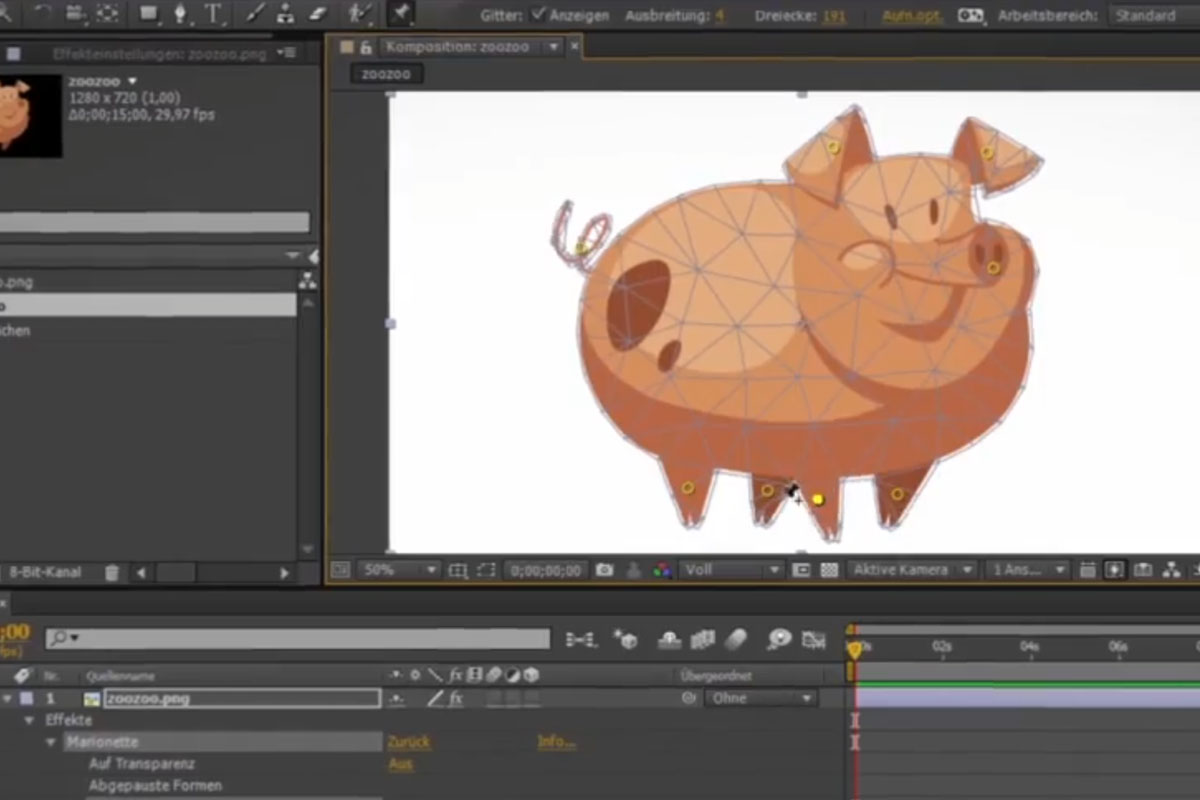
After Effects for beginners: Puppet Tool
9 minWith the Puppet tool, you can easily and professionally animate solid layers with an alpha channel in After Effects. In this lesson, you will learn how to use the tool correctly to achieve your goal.
After Effects for beginners: Keyframe interpolation graph
15 minIf you already know how to use keyframes successfully, you are probably still missing the knowledge about the diagram editor, which I will teach you in this lesson.
After Effects for beginners: Workflow between PS CC and AE CC
11 minYou can easily place designs that you have created using Photoshop as a fully-fledged composition in the middle of After Effects and even animate them. Learn how to do this in this lesson.
After Effects for beginners: Using a displacement map
10 minWith Displacement Map you can create unique and real effects. Learn how to use this powerful plug-in that comes with After Effects to achieve the best possible results.
After Effects for beginners: Vignette, colors and levels & reflections
10 minThere are many ways to make a project look more exciting. In addition to reflections or vignettes, tonal value corrections or color changes are ideal for creating new looks.
After Effects for beginners: Text animation & slider
7 minAnimate texts with ease using the presets already integrated in After Effects. Adjust them according to your own wishes and learn how to create simple sliders. Everything in this lesson.
After Effects for beginners: Masks and transfer from Illustrator
17 minYou will learn what it means to work with masks, what they are and how to put them together to create overall compositions. A working file is included.
After Effects for beginners: RGB effect
19 minWho doesn't know them? Great effects that can only be achieved with expensive plug-ins. Very few people know that After Effects can still display and create many effects with a little knowledge. You will learn how to create just such an effect in this video training. It is an RGB split effect with channel shift and noise. A working file is included.
After Effects for beginners: Depth of field
15 minYou will learn how to activate depth of field in After Effects, how to use it and how to make use of certain automatisms. A working file is included.
After Effects for beginners: Building a camera rig
15 minIn this video training you will learn how to create a camera rig and move it safely through 3D space. A project file is included.
After Effects for beginners: Splitter effect part 1
15 minIn the first of two parts of this tutorial, you will learn how to work with sub-compositions and arrange them in 3D space.
After Effects for beginners: Splitter effect part 2
18 minIn the second of two parts, you will learn further techniques and flights through the 3D space and complete the animation.
Create projects
After Effects for beginners: 3D drop composition with strokes
21 minIt is possible to create really great effects and animations from After Effects without much effort. In this lesson you will learn how to create a drop animation with some strokes and a cool 3D camera flight.
After Effects for beginners: Creating a light trail
14 minCreate a light trail without any 3rd party plug-ins - an effect that is easy to create using the parameters already provided in After Effects.
After Effects for beginners: Glass effect
13 minCreate a cool glass look without any additional plug-ins. You will find all the necessary files and the project file in this project. Of course, you can also replace the predefined image with your own to create great looks.
After Effects for beginners: Animated wedding card
18 minIn this lesson, create a wedding card from some preset materials and amaze your guests. The project file is included and can be filled directly with your pictures.
After Effects for beginners: Universum titles
15 minThe built-in functions and plug-ins make it easy to create great intros. Learn how to conjure up such intros with a few simple steps and tricks.
After Effects for beginners: Animated GIF banners in After Effects
17 minIn this short video training, I'll help you create a banner with an impulsive text effect. I show you how Photoshop and Adobe After Effects work together and the final export as a GIF animation.
Examples of use
-
 After Effects for beginners
You might also like
Produce high-quality videos
Practical applications for companies
How it works. What options exist.

Edit films, transitions, animations, and more
Comment now „After Effects for beginners“