
Imagine an element doesn't disappear abruptly, but slowly dissolves, and shortly afterwards it reappears piece by piece. You can achieve exactly this effect with jQuery without much effort. The functions fadeOut() and fadeIn() take care of the animation for you; you only have to specify which element is affected and how long the process should take.
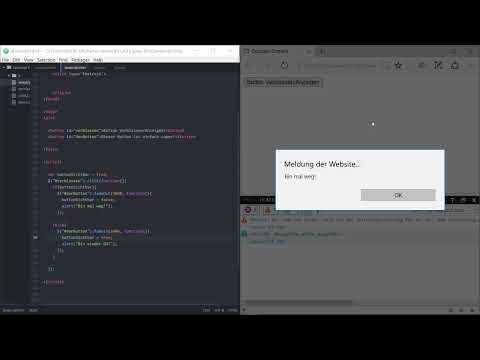
The video is only loaded from YouTube when you play it – data (including your IP address) is then transmitted to YouTube/Google. More in the privacy policy
You will go through this example step by step. You begin with two buttons, use a simple true-or-false variable to store the visibility state, and finally learn how callback functions control the flow.
Key Takeaways
fadeOut(time, callback)fades an element out over the specified time in milliseconds.fadeIn(time, callback)fades an invisible element back in over the specified time in milliseconds.- A boolean variable remembers whether an element is currently visible and helps you perform the right action on each click.
- The callback function is only executed when the animation is complete. There you can update variables or start further animations.
Step-by-Step Guide
Step 1: Create the buttons
First, create two buttons in your HTML document. The first button has the ID verblassen and controls the animation. The second button with the ID button is the element that should disappear and reappear. The texts are secondary here; what matters are the IDs, because jQuery uses them to access the elements.

Step 2: Create a variable for the visibility state
An element is either visible or invisible. For this you need a boolean variable that stores either true or false. The initial value is true, because the button is visible when the page loads. This variable is the key to the entire logic, because with each click you check what state the button is currently in.

Step 3: Create the click handler and the if statement
Now you define what should happen when the fade button is clicked. With $("#verblassen").click(...) you react to the click. Inside the function, you use an if statement to check whether the button is currently visible. If so, the other button should fade out.
Make sure to use a double equals sign for comparisons. A single = only assigns a value and leads to an error in the example. You will deliberately recreate this error later to see how the console reports it.
Step 4: Execute the fadeOut with time and callback
The function fadeOut() expects two parameters. The first is the duration of the animation in milliseconds. With 3000, you make the button disappear within three seconds. The second parameter is a callback function that is executed after the animation is complete. In this callback, you set the variable buttonSichtbar to false. This is very important, because without this line your program does not know that the button is invisible, and the next click would react incorrectly.
Step 5: Find and fix the error
After saving and refreshing the page, you can test the button. It slowly fades and disappears. If an error appears in the console, for example with the message "expected" in a certain line, it is usually due to a typo in the condition. In the video, the equals sign was missing in the if statement. The correction is quickly made, and afterwards the animation works as expected.

Step 6: Fading the button back in with fadeIn
So that the button also reappears after it has disappeared, you extend your query with an else branch. This branch is executed when the variable is false, that is, when the button is invisible. The function fadeIn(5000, ...) makes the button appear gradually within five seconds. Here, too, you reset the variable in the callback, this time to true.
With this solution, the button switches between the two states with every click. The messages via alert() are just an example; they show you that additional code can be executed at the end or at the beginning of the animation.
Step 7: Adding a third button as a reaction
Animations can also be chained together. To do this, add a third button with the ID dritterButton and a suitable text. It should appear as soon as the second button has disappeared. To do this, you simply call fadeIn for the third button in the callback of fadeOut. You no longer need a separate variable or an additional show() for this, because the third button is invisible in the initial state anyway.

So that the third button can also disappear by itself, you create its own click handler with fadeOut(). This way you see that every button can be controlled with the same functions.

Step 8: Understanding or omitting the callback function
The callback function is optional. You can also use fadeOut and fadeIn without it. The animations then simply run over the specified time, without anything happening automatically afterwards. In the video, this becomes clear when the third button is started without a callback: both animations run independently of each other in time. For cleanly structured sequences in which one action should follow another, however, the callback is indispensable.
Step 9: A clean initial state and an exercise
If you want to build the project cleanly, you hide the button that should appear later already when the page loads. You achieve this with CSS, for example via display: none; in the style section or directly in the file. This way the page doesn't look restless when loading, and the button only appears after the click.
As a small exercise, you can try hiding the button in the initial state via CSS and then making it visible with fadeIn(). The next step will be about animations in jQuery that are even more flexible than simple fading in and out.


Summary ??? jQuery fadeIn and fadeOut: Elegantly fading elements in and out
With fadeOut() and fadeIn(), elements in jQuery can be smoothly made to disappear and reappear. You specify the duration in milliseconds. A boolean variable stores the state so that with every click you know which action has to follow next. The callback function ensures that code is executed after the animation has finished, for example resetting the variable or fading in another element. With a little practice, you can build sequences in which buttons, notices or content react dynamically to user actions.
FAQ
How long does a fadeOut animation last by default?Without a specified time, the animation in jQuery runs at the default speed "normal", which corresponds to about 400 milliseconds. With a numeric value such as 3000, you determine the duration yourself.
Why should I use a boolean variable?An element is either visible or invisible. The variable stores this state and prevents the wrong action from being executed on click, such as fading out an element that is already invisible.
What happens if I omit the callback function?The animation still runs, but no further action is executed once it has finished. The variable is then not updated automatically, which is why the logic can become error-prone.
Can I chain fadeIn and fadeOut together?Yes, by writing the call of fadeIn into the callback function of fadeOut. This way the second animation only starts once the first one has finished.
Why do I get an error message with my if query?Often an equals sign is missing in the comparison, or there is only a single equals sign. In conditions, always use the double equals sign for comparing.


