
Imagine your program should react differently depending on the weather: if the sun is shining, you go outside; if it is snowing, you still go outside; and in all other cases nothing happens. This is exactly what you need conditional statements for. In this tutorial, you will learn with if, elif and else how Python makes decisions. You will work in a new Python 3 notebook and build up the examples step by step, so that you can follow every intermediate state yourself.
The video is only loaded from YouTube when you play it – data (including your IP address) is then transmitted to YouTube/Google. More in the privacy policy
You should already be familiar with basic data types such as strings, integers, floats, lists or dictionaries. You will now draw on exactly these, because conditions almost always check values stored in variables.
Key Takeaways
- With
ifyou check whether a condition is true and execute the indented code only in that case. elifadds further checks that only apply if all previous conditions are not met.elsecatches all cases that were not checked before. The statement is optional.- Python processes conditions from top to bottom. As soon as one is met, the remaining branches are ignored.
- With
andandoryou combine several conditions in a single query. - Indentation is crucial in Python, because it determines which code belongs to which condition.
Step-by-Step Guide
Step 1: Create a Notebook and Understand the Basic Structure
First create a new Python 3 notebook and give it a meaningful name, for example "if-elif-else". The three keywords if, elif and else form the basic structure of all conditional statements. You need to know them before you start with the first examples.

Step 2: The Idea Behind the if Statement
With an if statement you ask your program a question: Is a condition met? If that is the case, the code indented below it is executed. If the condition is not met, this block is simply skipped. This is exactly how the decision logic works, which you will expand piece by piece in the following steps.

Step 3: Create Variables for the Weather
Create two variables that describe the current state. The first is called Sonne_scheint and gets the value False, the second is called Schnee and gets the value True. Spaces are not allowed in variable names, so you use an underscore. The values True and False are Booleans and are ideal for conditions.
Step 4: Write the First if Query
Now you check whether the sun is shining. To do this, write if Sonne_scheint: and below it, indented, a print statement such as print("Ich gehe raus"). Note the colon at the end of the line. Since Sonne_scheint is set to False, nothing happens at this point. Change the value to True as a test and run the cell again to see the difference.

Step 5: Check Another Condition with elif
If the sun is not shining, something else can still apply. This is where elif comes into play. With elif Schnee: you check a second condition, which is only checked at all if the first one is not met. If you output print("Ich gehe raus, da es schneit") below it, you will see exactly this message when Schnee = True. By the way, the name elif stands for "else if" and is the typical Python spelling.
Step 6: Cover All Remaining Cases with else
With else you catch all situations that have not been checked so far. The statement has no condition of its own and always comes at the very end of the chain. Output print("Ich mache gar nichts") below it. If you set both Sonne_scheint and Schnee to False, exactly this message is displayed, because none of the previous conditions are met.

Step 7: Understanding the Order of Execution
Now you observe how Python works through the chain. Set Sonne_scheint to False and Schnee to True. Python first checks the if condition, finds it false, and jumps to the elif. There the condition is true, so the message about snow is output and the else line is ignored. This strict order from top to bottom is the core of the concept. When testing, make sure you change the values deliberately to verify this behavior yourself.

Step 8: What Happens When Multiple Conditions Apply
Now set both Sonne_scheint and Schnee to True. The output is then only "Ich gehe raus", even though the second condition would also be true. The reason: as soon as one condition in a chain is fulfilled, all further branches of that chain are skipped. The first condition that applies wins. This is an important property that you should always keep in mind when designing queries.
Step 9: Combining Multiple Conditions with and
So far you have only checked individual conditions. With the operator and you connect multiple conditions into a single query. To do this, create a variable Alter with the value 16 and use if Alter >= 18 and Alter < 100: to check whether someone is of legal age and at the same time under 100 years old. The code is only executed when both parts are true. For the test with 16, the condition therefore remains false.

Step 10: Building an Age Check with elif and else
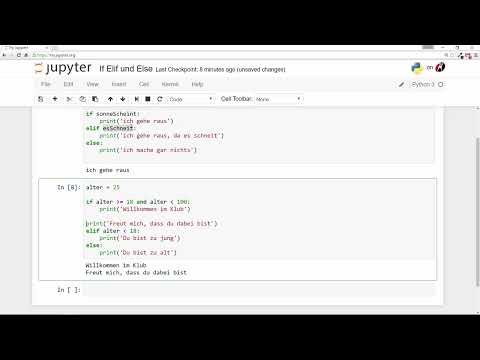
Now you build a complete chain for a small club. The first condition is if Alter >= 18 and Alter < 100: and outputs "Willkommen im Club!". With elif Alter < 18: you catch younger people, and else covers the rest, that is, people aged 100 and over. Test the chain with 16, 19 and 119. You will notice that each value triggers exactly one branch.
Step 11: The Importance of Indentation
Python does not use curly braces to delimit code blocks. Instead, indentation determines which line belongs to which condition. Everything that belongs to an if, elif or else must be at the same indentation level. Add a line like print("Freut mich, dass du dabei bist!") to the age check and make sure it is at exactly the same level as the other print statements of the block. An empty line in between does not matter, but the indentation does.

Step 12: Recognizing Typical Errors Caused by Incorrect Indentation
This is where it gets practical. If you indent a line incorrectly, you will either get an error message like "invalid syntax" or the code will behave differently than expected. If, for example, the greeting is no longer inside the block, it is output regardless of the condition. If you additionally insert a new, standalone if query with if Alter < 18:, each line still remains tied to its indentation. This helps you understand why indentation is so strict in Python.

Step 13: Comparing Strings and Using an if Without else
Conditions work not only with numbers but also with strings. Create a variable Name = "Dennis" and use if Name == "Dennis": to check whether the name matches. In the else branch you output, for example, "Hi unbekannter Du". Note that the comparison is done with a double equals sign. A single = only assigns a value. By the way, you don't always have to write an else branch. An if query without an alternative is perfectly fine if something should only happen for certain values.

Step 14: Allowing Multiple Alternatives with or
The operator or is the counterpart to and. The condition is already fulfilled if at least one of the parts is true. An example: if Name == "Dennis" or Name == "Franz": outputs "Hallo mein Freund" as soon as the name is one of the two people. This saves you from writing multiple separate queries with the same output.

Step 15: Note the difference from other programming languages
Finally, an important note: in many other languages, the branch is called else if or elseif. Python does not have this keyword. If you write elseif, you will get an error message. The Python version is elif. Python deliberately relies on minimal syntax, omits parentheses and commas in many places, and as a result often looks clearer. Take your time trying out the examples, change the values, and observe the outputs. This is the best way to solidify your understanding.
Summary ??? Python if, elif, and else: Understanding and applying conditions
You have seen how if checks a condition, elif adds further cases, and else covers all remaining situations. Python works through this chain from top to bottom, and as soon as a condition is met, the remaining branches are ignored. With and and or you combine multiple conditions, and the indentation determines which code belongs to which branch. Once you have mastered these basics, you can move on to loops, which execute tasks repeatedly.
FAQ
Do I always have to write an else branch?No, else is optional. You can also use just an if statement if something should happen for certain values and nothing otherwise.
What is the difference between elif and else?With elif you check another condition, while else catches all cases that were not checked before and therefore has no condition of its own.
Why does elseif not work in Python?Python does not recognize the keyword elseif. The correct spelling is elif.
What happens if several conditions are true at the same time?Only the first matching branch is executed. All following branches of the same chain are skipped.
When do I use and and when or?With and, all partial conditions must be true; with or, a single true partial condition is enough.
Why is indentation so important in Python?Python uses indentation instead of curly braces to define code blocks. Incorrectly indented code leads to errors or unexpected outputs.


