
Imagine your program could ask the user for their age and then output something personal. That is exactly what you will learn in this tutorial. Until now, your programs have only processed values that were hard-coded. With the input() function, you change that, because your program then waits for input and works with whatever the user types in.
The video is only loaded from YouTube when you play it – data (including your IP address) is then transmitted to YouTube/Google. More in the privacy policy
You will learn how to request input, convert it to the desired data type, read in lists, and process the input in your own function. All you need is a Python interpreter and a bit of patience while experimenting.
Key Takeaways
- With
input()you ask the user a question, and you store the result in a variable. - The return value of
input()is always a string, i.e. text. Even a number that is entered initially ends up in the variable as text. - With
str(),int()andfloat()you convert the input directly during assignment to the desired data type. - With
eval(), Python evaluates the input as an expression, so you can, for example, read in a list. You have to be careful here, sinceeval()can execute arbitrary code. - A function that requests and processes input makes your program clear and reusable.
Step-by-Step Guide
Step 1: Requesting the first input with input()
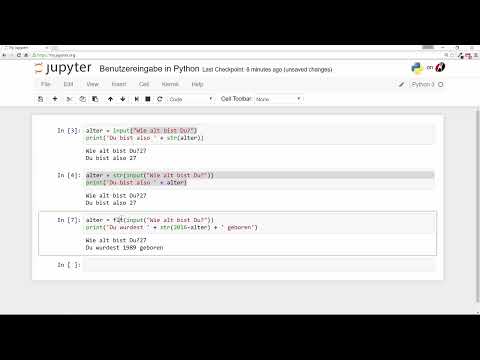
Getting started is easier than you might think. You write input() and pass the text the user should see in the parentheses, for example "Wie alt bist du?" ("How old are you?"). You then store the input in a variable called alter. At this point, your program stops until the user has typed something and confirmed it with Enter.
Pay attention to the space at the end of the question. Without it, the input appears directly after the question mark.

Step 2: Outputting the input and using it further
An input is only useful if you continue working with it. You can output it via print(). Since alter is text in this case, you can concatenate it directly with other text. For concatenation, the content of the variable must be a string. If you additionally convert the input with str(), you are on the safe side, even if you change the data types later.
After starting, you type in 27, for example, and the program outputs "Du bist 27 Jahre alt." ("You are 27 years old."). So the user has passed exactly the value that you stored in the variable.

Step 3: Doing the conversion directly in input()
If you always have to convert the input into a string, you can save yourself the conversion at the point where you need it. Instead, you write str() directly around the input() function. The variable then contains a string from the start, and the later output becomes clearer.
This variant leads to the same result as before, just without the additional step in the output. With it, you can make sure that the data type is already correct at assignment.

Step 4: Recognizing that input() already returns a string
Here lies a common misunderstanding. The input() function automatically returns everything the user types as a string. Your str() is therefore superfluous in this case. It does no harm, but nothing additional is converted. You should therefore only use it if it makes things easier to read.
The difference only becomes relevant when you want to calculate with the input. For that, you need a different data type.

Step 5: Convert the input into an integer with int()
If you want to calculate with the age, for example add to it, you need an integer. For this you use the function int(). It converts the text into a whole number so that you can then calculate with the value.
If you enter 27, you get the output 28. Without int(), Python would treat "27" only as text, and adding a number to it would trigger an error. With float() you achieve the same for decimal numbers.
Step 6: Solve an exercise on the year of birth
Now you can apply what you have learned. The task is to calculate the approximate year of birth from the entered age and output it. To do this, you ask for the age with int(input()) and calculate with a fixed reference year. You then output the result.
Try this exercise yourself first before you follow the solution. That way you learn the most.
Step 7: Output the result with parentheses and str()
In the solution, the calculation must be in parentheses so that it is executed before the concatenation. The result of the calculation is a number and not text. Therefore, before concatenating, you convert it into a string with str().
With the input 27, the result is the year 1989. Note, however, that the reference year 2016 is hard-coded in the code. The result is therefore only approximately correct, because in the current year the calculation would be slightly off again. This is exactly what shows you how important it is to critically question hard-coded values.

Step 8: Read in decimal numbers with float()
If your input is supposed to be a decimal number, for example a body height or a price, you use float() instead of int(). The procedure remains identical. You only change the conversion function.

Step 9: Read in a list and understand the error
Now it gets more exciting. You want the user to enter several cities, and then you output them. First you try to simply store the input in a variable staedte and output it. However, if you do not define the variable beforehand or swap the lines, you get the message that staedte is not defined.
The lesson from this: A variable must exist before you use it. Also make sure that the order of your code is correct, because Python reads it from top to bottom.

Step 10: Read in a list correctly with eval()
The function input() always returns only text. If you want a real list, you can have the input evaluated with eval(). Python then interprets the input as an expression and creates a list from it. For this, the user must type the input in Python format, that is, with square brackets and quotation marks.
If you enter ['Berlin', 'München', 'Köln'], you get a real list back. Without quotation marks and brackets, Python would evaluate the names as variables and report an error again.
An important warning: eval() executes everything that is entered. In your own learning programs this is harmless, but in programs that other people use, it can become dangerous. Therefore, only use eval() if you trust the person entering the input or control the input yourself.

Step 11: Create your own function for the inputs
So far, your code has simply been listed one line after another. With a function, you bundle several steps into a single unit that you can call as often as you like. In the example, the function kennenlernen asks for the name and the age and stores both in two variables.
Pay attention to the indentation below the line with def. Python uses it to recognize which statements belong to the function. At first, the function is only defined and does not run yet.

Step 12: Calling the function and improving the output
For the function to be executed, you call it by its name with parentheses. A call looks like this: kennenlernen(). After that, you answer the questions in the terminal, and the program prints the greeting.
The greeting still seems a bit clumsy. A comma after "Hallo" and a suitable sentence structure make it more relaxed. Change the output step by step until you like it.


Summary – User Input in Python: input(), Data Types and Custom Functions
With input(), you give your program the ability to react to the user. The input always arrives as text, and with str(), int() or float() you determine which data type you want to continue working with. For lists, eval() is suitable, provided you control the input. A custom function like kennenlernen keeps your code clear and can be reused at any time. As a next challenge, you can write a function that asks for two numbers and combines them, for example by addition or multiplication, depending on which operation the user chooses.
FAQ
What is the difference between input() and eval()?input() always returns the input as text. eval() evaluates the input as a Python expression and gives you, for example, a list or a number.
Why do I get an error when I calculate with the input?The input is probably still text. Convert it to a number with int() or float() before you calculate.
Do I need str() with input() if the input is already text?No, input() already returns a string. The str() is then unnecessary, but it does no harm.
Why do I get the message "name not defined"?Python does not know the variable at this point yet. Define the variable beforehand or check the order of your lines.
Is eval() safe to use?Not always. eval() executes arbitrary code, so you should only use it with trusted input or in your own learning programs.
How do I call a function I wrote myself?You write the function name with parentheses, for example kennenlernen(). Only this call executes the statements in the function.


