
A program that crashes with a red error message at the first wrong input quickly appears unprofessional to users. With clean error handling, you can prevent such crashes. That is exactly what this section is about: You will learn what exceptions are, how to find their cause, and how to catch them with try and catch blocks so that your program keeps running.
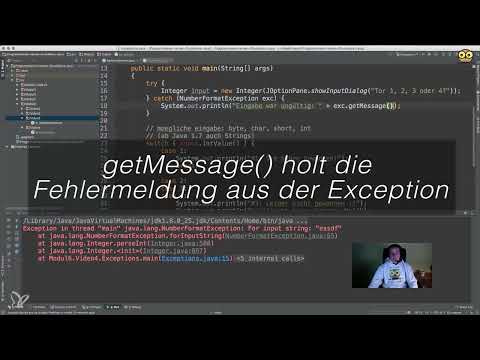
The video is only loaded from YouTube when you play it – data (including your IP address) is then transmitted to YouTube/Google. More in the privacy policy
Key Takeaways
- Exceptions are deviations in the program flow, for example with invalid inputs or access to non-existent elements.
- In the stack trace, you find the class and the line number where the error first occurred.
- The try block contains the code that might trigger an error.
- The catch block catches a specific exception and determines how you react to it.
- Variables that you declare in the try block are not visible outside this block.
- With the Exception class, you can catch all error types, but you should only use this selectively.
Step 1: Finding the Cause of the Error in the Stack Trace
Before you handle an error, you need to know where it originates. To do this, enable the display of line numbers in your development environment. A right-click on the area next to the code opens the menu in which you check "Show Line Numbers".
Then start the program with an invalid input, such as the text "ESDF" in an input dialog that actually expects a number. The stack trace appears at the bottom of the console. The first line names the type of the exception, here NumberFormatException from the package java.lang, and the value that could not be processed. The lines below show the path along which the error arose. The topmost line with a file name and a line number is the decisive spot in your own code. All further entries are usually consequential problems.

Step 2: Creating the try Block and the catch Block
As soon as you know which code triggers the error, you can safeguard it specifically. The try block is the area in which you tell the program: "Please try this out." Everything between the curly braces is executed. If an exception occurs in it, the program jumps immediately to the matching catch block.
The catch block specifies which exception should be caught. For the faulty conversion of an input into a number, it looks like this:
The variable e is the exception object. Through it, you can access information about the error in the catch block.

Step 3: Evaluating the Error Message
In the catch block, you can do more than just output a fixed message. With e.getMessage(), you have the text of the exception displayed. This way you can recognize which input caused the error.
Feel free to try this out and enter a text again. You will then see what the message looks like and what information it contains. For users, however, this technical output is often too cryptic. It is more suitable for troubleshooting during development.
Step 4: Paying Attention to the Scope of a Variable
If you now try to use a variable that you created in the try block after the block, the compiler reports an error with the message "cannot find symbol". The reason is the scope: A variable exists only within the block in which it was declared. Outside the try block, the program does not know it.
You have two options here. The first is to move all the subsequent code into the try block. This works, but quickly leads to heavily nested structures that are hard to read. The second option is usually the better solution: You declare the variable before the try block.

Step 5: Declaring the Variable Before the try Block
Create the variable in the outer scope, for example directly in the main method, and initialize it with null. Within the try block, you then assign the value to it. If the conversion fails, the variable remains null and the program continues normally after the block.
This way your code stays clear, and you don't have to embed the rest of the logic in the try block.

Step 6: Testing the behavior with an invalid input
Start the program again and enter an invalid value again. This time it doesn't crash. The catch block outputs the message, and since the variable is set to null, you can react to this state in the rest of the flow, for example with a message like "Goal null does not exist". The program then continues in an orderly fashion.
For users, you can also word the message in a friendlier way, for example "Invalid input". The technical debug message is then reserved for developers.

Step 7: Catching general exceptions
Besides NumberFormatException there are many other error types, such as NullPointerException or ArrayIndexOutOfBoundsException, which occurs when you access a non-existent array element. You can catch each of these errors specifically.
If you want to catch all errors, you use the general class Exception. It is the superclass of all exceptions, so the block catches all types derived from it. This is useful if you want to keep the program running, for example to write an entry to a log file. Note, however, that you can then no longer classify the specific error precisely.

Step 8: Combining multiple catch blocks
You can also combine a try block with multiple catch blocks. The order is important here: the specific error comes first, and the general Exception block comes last. If an exception matches a block, only that block is executed.
This way you handle known errors specifically and still catch all remaining cases.

Summary – Catching Java exceptions with try/catch: step by step
Exceptions are no reason to let a program crash. With the stack trace, you find the place where the error occurs. The try block contains the code that can fail, and the catch block determines how you react to it. Declare variables that you still need after the block before the try block. With specific and general catch blocks, you handle both known and unexpected errors. Custom exceptions and throwing errors in your own classes will be covered in a later section.
FAQ
Question: What is the difference between an error in the program and an exception?Answer: An exception is an exceptional case that interrupts the normal program flow and is passed on as an object, so that you can react to it specifically.
Question: What is the stack trace for?Answer: The stack trace shows the path of method calls that led to the error and names the line in which the exception first occurred.
Question: Why do I get the message "cannot find symbol"?Answer: A variable that was declared in the try block is not visible outside this block. Therefore, declare it before the try block.
Question: Can I react differently to multiple error types?Answer: Yes, you can write several catch blocks one after another, whereby the specific error should come before the general Exception block.
Question: Does it make sense to always catch the Exception class?Answer: Only to a limited extent, because you lose the precise information about which error occurred. It is better to use the general block as a safety net at the end.


