
As soon as you want to process more than a single value in Python, you can't avoid loops. Besides the familiar while loop, there is the for loop, which feels much more Pythonic and is particularly well suited for lists and dictionaries. In this tutorial, you will learn how to iterate through both data types element by element, how to access keys and values, and when which notation makes sense.
The video is only loaded from YouTube when you play it – data (including your IP address) is then transmitted to YouTube/Google. More in the privacy policy
Key Takeaways
- A for loop iterates through each element of a collection, such as a list, one after another.
- The notation
for variable in sammlung:applies equally to lists and dictionaries. - When iterating through a dictionary, you get the keys by default.
- With
keys(),values()anditems(), you control specifically whether you get keys, values or both. - The
items()method returns tuples that you can unpack directly into two variables.
Step-by-Step Guide
Step 1: Create a list as a foundation
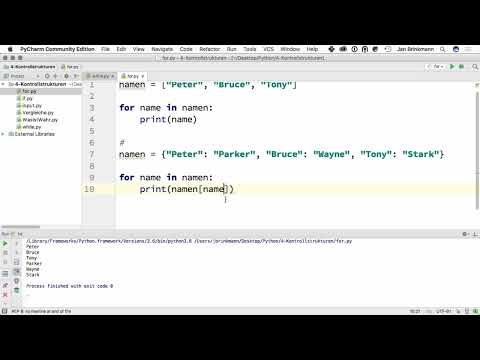
Start with a simple list containing three names. You store it in a variable called namen. Lists are enclosed in square brackets, and the individual entries are separated by commas. This list forms the data basis for all of the following steps.

Step 2: Write the for loop over the list
Now comes the actual loop. Write for name in namen: and then add a colon. The variable name takes on the next entry of the list with each iteration. Below it follows the command print(name), which must be indented. In Python, indentation is not a design feature but determines which lines belong to the loop.

Step 3: Run the program and check the output
Start the program using the run command of your development environment. You get all three names printed one below the other. The loop has therefore run three times, once for each element of the list. This basic principle stays the same regardless of the length of the list.

Step 4: Create a dictionary
You store a dictionary in curly braces as pairs of key and value. In the example, the first names serve as keys and the last names as values. So you write personen = {"Peter": "Parker", "Bruce": "Wayne", "Tony": "Stark"}. Make sure there is a colon between key and value and that the pairs are separated by commas. Especially with larger dictionaries, this structure helps you recognize assignments at a glance.

Step 5: Iterate over the dictionary
The loop works with a dictionary just as it does with a list. Write for name in personen: and output name with print(name). You will notice that only the keys are output, namely Peter, Bruce and Tony. This is Python's default behavior when iterating through a dictionary and should be the first thing you are aware of, because it can cause confusion later.

Step 6: Access the values via the key
If you want to output the last names instead, you use the current key to retrieve the associated value. To do this, write print(personen[name]). The brackets after the dictionary name contain the key. The output is now Parker, Wayne and Stark. This variant is particularly suitable when the assignment is not directly in the code but comes from other sources.
Step 7: The explicit notation with keys()
The keys() method explicitly returns all keys of the dictionary. So write for name in personen.keys():. The result corresponds exactly to the iteration from step 5. The advantage lies in readability: at first glance you can see that a dictionary is being processed here and that you are looking at the keys. Especially in longer programs, this more verbose form can prevent misunderstandings.

Step 8: Output only the values with values()
If you only need the values, use values(). Write for nachname in personen.values(): and output the variable with print(nachname). This saves you the detour via the key, and the output is once again Parker, Wayne and Stark. Consider beforehand whether you really only need the values or whether you will later depend on the corresponding keys.
Step 9: Process keys and values together with items()
The items() method returns the key and value together as a tuple. Write for vorname, nachname in personen.items(): and below it print(vorname, nachname). During each iteration, the two variables take on the key and the value respectively. The output is Peter Parker, Bruce Wayne and Tony Stark. This variant is usually the most suitable when you need both pieces of information at the same time. As a rule of thumb: If you only need keys, use the loop directly over the dictionary or keys(). If you only need values, use values(). If you need both, items() is the cleanest solution.
Summary – Python For Loop: Iterating Through Lists and Dictionaries
You have seen that the for loop works according to the same pattern with lists and dictionaries. With lists, you get the elements directly; with dictionaries, you initially get the keys. Via keys(), values() and items(), you control exactly what arrives in the loop. Choose the variant that suits your task, and pay attention to clean indentation. With this basic knowledge, you can reliably evaluate data structures in Python.
FAQ
What is the difference between a for loop and a while loop?A for loop iterates through a known collection element by element, while a while loop runs as long as a condition is true.
What does a loop over a dictionary output by default?By default, only the keys are output; you only get the values via access with the key or via the values() method.
Does the loop variable have to be called name?No, you can choose the name freely. However, a meaningful name such as name or nachname makes the code much easier to understand.
What is the items() method used for?The items() method returns the key and value together as a tuple, which you can directly unpack into two variables.
Why is the indentation after the colon so important?Python uses indentation to recognize which commands belong to the loop. If the indentation is missing, the program reports an error.


