
Imagine you are programming a small online shop. The price of an item is a number with decimal places, the number of items in stock is a whole number, and the question of whether a product is available can only be answered with yes or no. Python largely manages these values on its own, but if you know their data types, you will spot errors faster and avoid unexpected results.
The video is only loaded from YouTube when you play it – data (including your IP address) is then transmitted to YouTube/Google. More in the privacy policy
In this tutorial, you will explore the most important numeric data types in the Python console. You will learn how to determine the type of a value, what integers, floating-point numbers, and Boolean values look like, and why a leading zero is not allowed in Python. Finally, you will look at numbers in other number bases, namely binary and hexadecimal.
Key Takeaways
- With the built-in function
type(), you can find out which data type a value has. - The data type
intstands for whole numbers such as 5 or -10. - The data type
floatstands for floating-point numbers, that is, numbers with decimal places, such as 3.141. - The data type
boolonly knows the two valuesTrueandFalse. - Leading zeros as in
05are invalid in Python and result in an error message. - You specify binary numbers with the prefix
0band hexadecimal numbers with the prefix0x.
Step-by-Step Guide
Step 1: Open the Python Console and Get to Know type()
Open the Python console, where you can enter commands directly and see their result immediately. With the built-in function type(), you can determine which data type a value or an object belongs to. To do so, enter type(, write the value inside, and close the parenthesis. Python responds with the name of the data type. You will use this function again and again in the following steps.

Step 2: Recognize Whole Numbers as int
Enter the value 5 in the console and then call type(5). Python shows you the class int. This stands for integer, that is, a whole number without decimal places. Internally, the value is represented as a so-called int object. Whole numbers can be positive, negative, or zero, so values like -10 also belong to the data type int.
Step 3: Understand Floating-Point Numbers as float
Now try a number with decimal places, for example 3.141, and have it checked with type(). The answer is float, that is, floating-point number. Pay attention to the decimal point: Python uses the period and not the comma that is common in German. If you write 3,141, you get a different meaning, because in Python the comma acts as a separator between multiple values. This is a typical pitfall for beginners.
Step 4: Get to Know Boolean Values as bool
The data type bool is named after the mathematician George Boole, who developed Boolean algebra. It only knows two values: True and False. Enter both keywords in the console and check them with type(). In the console, they are displayed highlighted, which shows that they are reserved keywords of the language. You cannot use them as your own variable names. Boolean values are useful whenever you store a state, for example whether a connection exists or not.
Step 5: Store Values in Variables
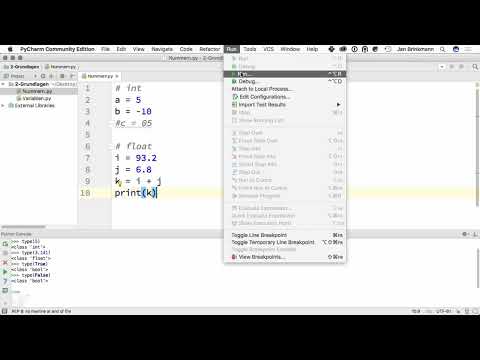
So far, you have only output values directly. To work with them, you store them in variables. Write a = 5 to store the value 5 under the name a. With b = -10, you create a negative integer. Afterwards, you can enter type(a) and get int again. The assignment with the equals sign therefore does not mean that two things are equal, but that the name a points to the value 5.

Step 6: Calculate with float Variables
Now create the variables i = 93.2 and j = 6.8. Then calculate k = i + j and output k. The result is 100. Note, however, that Python usually displays 100.0 for floating-point numbers, because the result is a float. Calculations with floating-point numbers are not always exact in the computer's binary system. For monetary amounts, you should therefore look more closely later. For this example, however, the representation is perfectly sufficient.

Step 7: Avoiding Leading Zeros
Try entering a number like 05. Python rejects this notation and displays an error message. The reason lies in how number literals are handled: in Python, a leading zero indicates the specification of a different number base, such as binary, octal, or hexadecimal. Since the zero without an additional letter does not form a valid literal, the input is erroneous. Therefore, remember that numbers in the decimal system are written without leading zeros, so simply 5 instead of 05.
Step 8: Entering Binary Numbers with the Prefix 0b
Numbers can also be specified in other bases. For binary numbers, you use the prefix 0b, which consists of the zero and the letter b for binary. The input 0b10 stands for the binary number 10, which has the value 2 in the decimal system. If you output the value with print(0b10), the decimal 2 still appears. So the input is binary, the output decimal. You will often encounter this notation in code that works with bits and bit operations, so it is worth having seen it once.

Step 9: Using Hexadecimal Numbers with the Prefix 0x
The hexadecimal system has base 16. It uses the digits 0 to 9 and the letters A to F, where A stands for 10, B for 11, and F for 15. For hexadecimal numbers, you use the prefix 0x. The input 0xA therefore yields the value 10. Enter print(0xA), and Python shows you the number 10 in the decimal system. You will often find hexadecimal notation in color codes, memory addresses, and error messages, so its prefix is an important identifying feature.

Summary – Mastering Numeric Data Types in Python: From int to Hexadecimal
In this tutorial, you have learned about Python's basic numeric types. With type(), you can check at any time which data type a value has. Integers belong to int, numbers with a decimal point to float, and the values True and False to bool. You now know why leading zeros are not allowed and how binary and hexadecimal numbers are written with the prefixes 0b and 0x. In the next step, you will see how these data types can be converted into one another and what you should pay attention to when doing so.
FAQ
What is the difference between int and float in Python?An int is a whole number without decimal places like 5 or -10, a float is a floating-point number with a decimal point like 3.141.
Why does Python use a period instead of a comma for decimal numbers?Python follows the international notation in which the period separates the decimal part. The comma has a different meaning in Python, for example as a separator in lists.
Can I use True and False as variable names?No, both words are reserved keywords of the language and cannot be used as variable names.
Why is the number 05 invalid in Python?A leading zero in Python indicates numbers in other bases. Without a matching letter such as b, o, or x, the notation is therefore erroneous.
How do I enter a binary number in Python?You put the prefix 0b in front of the number, for example 0b10 for the decimal value 2.
What does the prefix 0x stand for?It denotes a hexadecimal number, that is, a number in the base-16 system, for example 0xA for the value 10.


