
Imagine you are storing sales tax rates in your program and want to make sure that nobody accidentally overwrites them. This is exactly what tuples are for in Python. They are similar to lists, but cannot be changed after they have been created. In this guide you will learn how to create tuples, access their values, split them up with unpacking, and use them to swap variables elegantly. All you need is a Python environment and basic knowledge of variables and lists.
The video is only loaded from YouTube when you play it – data (including your IP address) is then transmitted to YouTube/Google. More in the privacy policy
Key Takeaways
Tuples are immutable: After creating them, you can no longer change their values. An attempt to assign a value leads to an error.
Access works like with lists: You read individual values via indices such as 0, 1 or -1.
Unpacking distributes values to variables: A group of values can be split across several variables in a single line.
Tuples are well suited for grouped return values: Functions can return multiple results as a tuple.
With tuples, you can swap variables without a helper variable: A single line replaces the classic swap using a temporary variable.
Step 1: Comparing Tuples and Lists
The key difference between tuples and lists lies in mutability. With a list, you can change, add or remove values afterwards. With a tuple, this is not possible. At first glance this seems like a restriction, but it offers advantages: the data is protected, and Python can process tuples slightly more efficiently because their content never changes.
In practice, you will still work more often with lists and dictionaries. Tuples are especially worthwhile where data is meant to stay fixed.

Step 2: Creating Tuples and Reading Values
As an example, you create the sales tax rates: 0%, 7% and 19%. You write the values in parentheses, separated by commas. Then you access them via indices, as with lists. Index 0 returns the first value, index -1 the last. So if you run print(steuersaetze[-1]), 19 appears.
Read access therefore works exactly as it does with a list. You can see the result directly in the output.

Step 3: Recognizing the Limits of the Tuple
Now you try to change a value. If you write steuersaetze[2] = 21, for example, Python aborts with an error message. It says, roughly, that the tuple object does not support item assignment.
This behavior is intentional. So you can still read, but you cannot assign. The error reliably shows you when somewhere an attempt is accidentally made to change protected data.

Step 4: Using Unpacking
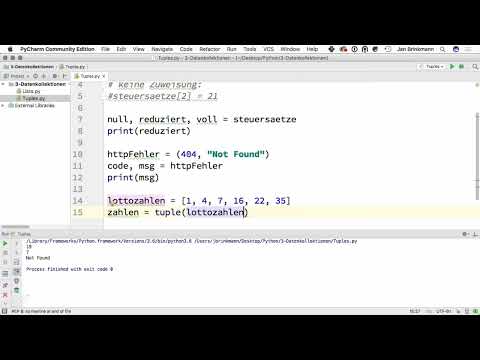
A very common use case is unpacking. Here you distribute the values of a tuple directly to individual variables. If you write null, reduziert, voll = steuersaetze, each variable automatically receives the matching value. The number of variables must match the number of tuple elements.
If you then output print(reduziert), 7 appears. In this way, you work with meaningful names instead of bare indices, which makes the code much more readable.


Step 5: Combining Different Data Types
Tuples may contain values of different types. One example is an error message with an HTTP error code. You can create a tuple with the number 404, the text "not found" and the abbreviation "http". You return this tuple from a function, for example.
In the calling code, you unpack it directly: code and message end up in their own variables, and an output such as print(msg) shows you "not found". Especially for functions that return several related results, this pattern is very common.


Step 6: Convert a list into a tuple
Sometimes data is created dynamically, for example as a list, and you don't want it to be changeable afterwards. One example is drawn lottery numbers such as 1, 4, 7, 16, 22 and 35. With the built-in function tuple() you convert the list into a tuple. After that, you can access individual numbers as usual, but you can no longer change the values.
Step 7: Swap variables without a helper variable
To swap two variables, you usually need a temporary variable. For example, if you set x = 5 and y = 10, the classic approach is to store the value of x temporarily, assign the value of y to x, and then assign the stored value to y. That works, but it is cumbersome.
With a tuple it can be done in one line: x, y = y, x. Python first builds the tuple on the right-hand side and then distributes it to the variables on the left. The output then shows you 10 and 5.

Step 8: Parentheses and further topics
Parentheses are not mandatory for a tuple. The comma alone creates the tuple. Nevertheless, writing it with parentheses is recommended, because it shows at first glance that a tuple is meant. This improves the readability of your code.
You can find further methods and details in the official Python documentation. In the next step of your course, dictionaries will be covered, which also play a central role in practice.
Summary – Understanding Python tuples: structure, access and practical application
Tuples are ordered, immutable collections of values. You create them with round parentheses or simply with commas, read their values via indices, and distribute them to individual variables when unpacking. They are suitable for data that should no longer change after creation, for function returns with multiple values, and for elegantly swapping variables. In practice, lists remain the tool of choice when you need to change data.
FAQ
What is the most important difference between a tuple and a list?Tuples are immutable, whereas lists are not. You cannot assign values in a tuple after it has been created.
Can I read a tuple with an index?Yes, read access works exactly as with lists, for example with steuersaetze[0] or steuersaetze[-1].
What happens if I want to change a value in a tuple?Python outputs an error stating that the tuple object does not support item assignment.
What does unpacking mean?With unpacking, you distribute the values of a tuple directly to multiple variables, for example with null, reduziert, voll = steuersaetze.
Do I always have to use parentheses with tuples?No, the comma creates the tuple. However, parentheses make the code clearer and are therefore recommended.
How do I convert a list into a tuple?With the function tuple(), for example tuple(lottozahlen).
How do I swap two variables with a tuple?With x, y = y, x in a single line, entirely without a temporary variable.
Why should I use tuples at all?Tuples protect data from unwanted changes and are a good fit for function returns where several related values are produced.


