
Imagine you open a project you wrote half a year ago and find a function whose purpose you can no longer remember. This is exactly where docstrings come in. They are short descriptions directly in the source code that explain what a function does. You benefit from them not only when other developers read your code, but also when you work on a project alone. In this guide, you will learn how to create docstrings, format them across multiple lines, and then retrieve them directly in the Python console.
The video is only loaded from YouTube when you play it – data (including your IP address) is then transmitted to YouTube/Google. More in the privacy policy
Key Takeaways
- A docstring is a string that is placed directly below the line in which the function is defined.
- For short descriptions, one line in single or double quotation marks is enough. You write longer texts over several lines using triple quotation marks.
- With the function
help(), you can display the docstring in the console at any time. - Docstrings are worthwhile even for small functions. It is best to make them a firm habit.
Step-by-Step Guide
Step 1: Looking at the Starting Function
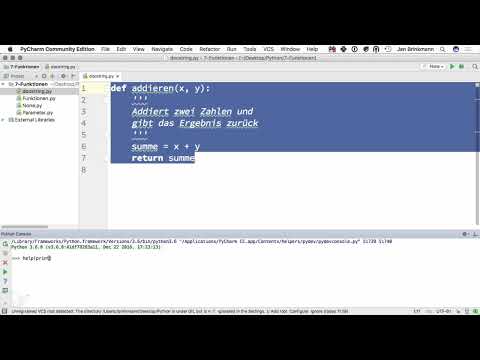
A simple function called addieren serves as the basis. It takes two parameters, x and y, and returns their sum. The code itself is quickly understood. But that is exactly what makes it an ideal example, because you can immediately see how much room there is for a description before the actual logic begins. The spot directly after the def line is reserved for this.

Step 2: Creating a Single-Line Docstring
Directly below the line def addieren(x, y):, write a string that describes what the function does. A suitable sentence would be, for example, "Adds two numbers and returns the result." The string is indented so that it belongs to the function body. It is not evaluated when the program is run and has no influence on the result.
Step 3: Writing Multi-Line Docstrings with Triple Quotation Marks
If the description gets longer, for example because you want to explain parameters or special features, a single line quickly becomes unclear. Then use triple quotation marks. This allows you to spread the text over several lines without having to mark each line separately. The docstring begins and ends with """, and in between you write freely formulated text. This way the source code remains easy to read even with more extensive explanations.
Step 4: Preparing the Documentation for Later Tools
A docstring helps not only when reading the code. External tools can read it out and automatically generate documentation from it. This is particularly useful when a project grows and many functions accumulate. If you consistently store the descriptions directly in the source code, you do not have to laboriously gather them from different files later. The documentation thus travels along with the code instead of becoming outdated in a separate document.

Step 5: Retrieving the Docstring of print in the Console
Before you document your own functions, it is worth taking a look at built-in functions. To do this, start the Python console and enter help(print). Python then shows you the help for the function print. This very text is the docstring of print. So you see what a well-documented function looks like, and you immediately get an idea of what information is helpful for others.

Step 6: Displaying Your Own Docstring with help()
After you have entered the function addieren with a docstring into the console, you can query it with help(addieren) as well. The output first contains a note on the parameters, that is, x and y. The text from the docstring follows. So you do not have to open the code to know what the function does. This is a great advantage when you work with functions from larger projects.
Step 7: Reading the Help Output Correctly
The help output is structured according to a fixed pattern. At the top is the function's signature with its parameters. Below it appears the text you stored in the docstring. Make sure your text is worded precisely, because this exact wording ends up in the output. A description like "adds two numbers and returns the result" is short, understandable, and says everything essential.
Step 8: Finding the Right Scope for Docstrings
Not every function needs a detailed docstring. For two lines of code that are self-explanatory anyway, a short sentence is often enough. The longer or more complex a function becomes and the less immediately obvious its purpose is, the more important detailed documentation is. You have to find a balance here. An overloaded docstring on a simple function looks just as cluttered as a missing docstring on a complex one.
Step 9: Making Documentation a Habit
In the end, routine is what decides. Get used to writing a docstring right away for every new function, even if you are working on the project alone. The effort is small, and the benefit shows at the latest when you look at your code again after a long time. If you add the docstring immediately while writing the function, the explanation won't get lost.
Summary – Docstrings in Python: Documenting Functions Properly
Docstrings are descriptions that you place directly below a function definition. For short explanations, one line is enough; for longer texts, you use triple quotation marks. With help() you display the documentation in the console, and external tools can read it and generate documentation from it. You should write docstrings from the very beginning, adapt their scope to the complexity of the function, and thus develop a firm habit.
FAQ
What is a docstring in Python?A docstring is a string that comes directly after the definition of a function and describes its purpose.
When should I write a docstring?It is useful even for simple functions, but especially for extensive code or when the purpose is not immediately recognizable.
How do I access a docstring?You use the help() function in the Python console, for example help(addieren) or help(print).
Which quotation marks do I use for multi-line docstrings?You use triple quotation marks, that is, """ at the beginning and at the end of the text.
Does a docstring affect the result of my program?No, the docstring is not evaluated and has no influence on the result of the function.


