
You worked on exercise 5.2 and want to know whether your solution matches the model solution? Then it's best to go through it step by step here: how a program reads in measured values, stores them, calculates the average, and outputs the result. All you need are the basics from the previous chapters: lists, loops, type conversions, and output with print().
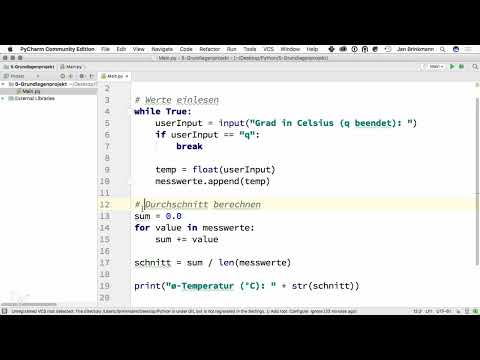
The video is only loaded from YouTube when you play it – data (including your IP address) is then transmitted to YouTube/Google. More in the privacy policy
Key Takeaways
- For measured values that are equal in rank and may occur multiple times, a list is better suited than a set.
- An infinite loop with
while Truekeeps reading in values until the user entersq. The loop is then ended withbreak. - You have to convert strings that were read in into numbers with
float()before you can calculate with them. - The average is obtained from the sum of all values divided by the number of values.
- For output, you convert the number into text with
str()and concatenate it with another string.
Step 1: Store the measured values in a list
It starts with an empty list in which all measured values are collected. The model solution deliberately uses a list and not a set. The reason lies in the behavior of the two data types: A set stores each value only once. If you measure exactly 10 °C twice, the second value would disappear and your average calculation would be distorted. A list, on the other hand, keeps all entries, including duplicates. That is exactly what you need here, because every measurement counts.

So take a closer look at the difference between the two data types when you test the exercise with your own values. The list is created with an assignment like messwerte = [].
Step 2: Build an infinite loop for reading input
So that the program can take in any number of measured values without you specifying the number beforehand, you use an infinite loop. In Python, you write while True: for this. The condition is always true, so the loop keeps running until you deliberately end it. Inside the loop, you ask for a new value each time with input().

You already know this construct from earlier exercises. The only new thing is that here you are not counting a fixed number of iterations, but waiting for a specific input.
Step 3: End the loop with "q" and break
The loop needs a signal to stop. The model solution agrees on the character q for this. If you use if to check whether the input is exactly q, you can trigger the termination. The break command then ends the loop immediately, and the program continues with the next section below the loop.
Make sure that the comparison is made exactly with the text "q" and that it is in quotation marks. Without the quotation marks, Python would look for a variable named q, which does not exist.
Step 4: Convert inputs and append them to the list
If no q was entered, the value that was read in must be processed further. The input from input() is always a string, i.e. a character sequence, even if you typed in a number. With float() you convert the string into a floating-point number. You store the result in a variable that is called temp in the model solution, because it is about a temperature. You can of course choose the name freely.

Then you append the converted value to the list using the append() method. Each new measurement thus ends up at the end of the list, and after the loop ends, the list contains all entered temperatures as numbers.

Step 5: Calculate the sum of all measured values
After the loop, the actual calculation begins. For this, you create a helper variable called summe and set it to 0.0. You write the starting value with a decimal point so that the variable is a floating-point number from the start. Then you use a for loop to go through all values in the list and add each individual value to the sum.

The loop therefore does not count the values themselves, but adds them up one after another. At the end, summe contains the total sum of all measured values.
Step 6: Calculate the average
The average is the total sum divided by the number of measured values. The built-in function len(), applied to the list, gives you the number. You store the result in a variable, for example durchschnitt. Since you collected all measured values in the list, the count is correct even if a value occurs multiple times.
This is also the reason why the list is so important. With a set, len() would not count duplicate values, and the average would be wrong.
Step 7: Output the result
Finally, the average temperature should appear on the screen. The value is a number, and print() should output a coherent sentence. Therefore, you have to convert the number into a string using str(). Then you concatenate this string with an accompanying text, for example using the plus sign. Concatenation only works if both parts are strings. You would not be able to append a number directly, which Python responds to with an error message.
The complete program flow then looks like this:
Test the program with several values, for example 20, 22 and 22, and compare the result with your own calculation. If you enter the same value twice, it should also be included twice in the calculation.
Summary – Calculating the temperature average in Python: Solution to Exercise 5.2
Exercise 5.2 can be solved with building blocks you already know. A list collects all measured values, including duplicates. An infinite loop with while True reads inputs until q is entered, and break ends it. Each input value is converted with float() and added to the list with append(). Then you add up all values in a loop into the variable summe, which starts at 0.0, and divide the sum by len(messwerte). The output works with print() if you first convert the number with str() and concatenate it with a text. If you can follow these steps, you have understood the exercise.
FAQ
Why does the sample solution use a list instead of a set?A list also stores duplicate values, whereas a set stores each value only once. With measured values, every measurement counts, which is why the list is the better choice.
What happens if I enter the same value twice?The value appears twice in the list and thus is included twice in both the sum and the count. This is intended for measured values.
Why do I have to convert the input with float()?The function input() always returns a string. With float(), you turn it into a number that you can calculate with.
Why does the sum start at 0.0 and not at 0?The starting value 0.0 is a floating-point number. This way, the sum is of the floating-point type from the start, which suits temperature values with decimal places.
What does break do in the loop?The break command ends the loop immediately. The program then continues with the calculation below the loop.
Why do I have to use str() for the output?In Python, you cannot directly join a text and a number with the plus sign. With str(), you convert the number into a string so that the concatenation works.
What happens if I enter q immediately?The list remains empty. An error then occurs during the division by len(), because division by zero is not possible. In an extended version, you should handle this case separately.
Can I replace the variable name temp with another one?Yes, the names can be chosen freely. The only important thing is that you use them consistently throughout the program.


